







A Significant Shift in YouTube Navigation
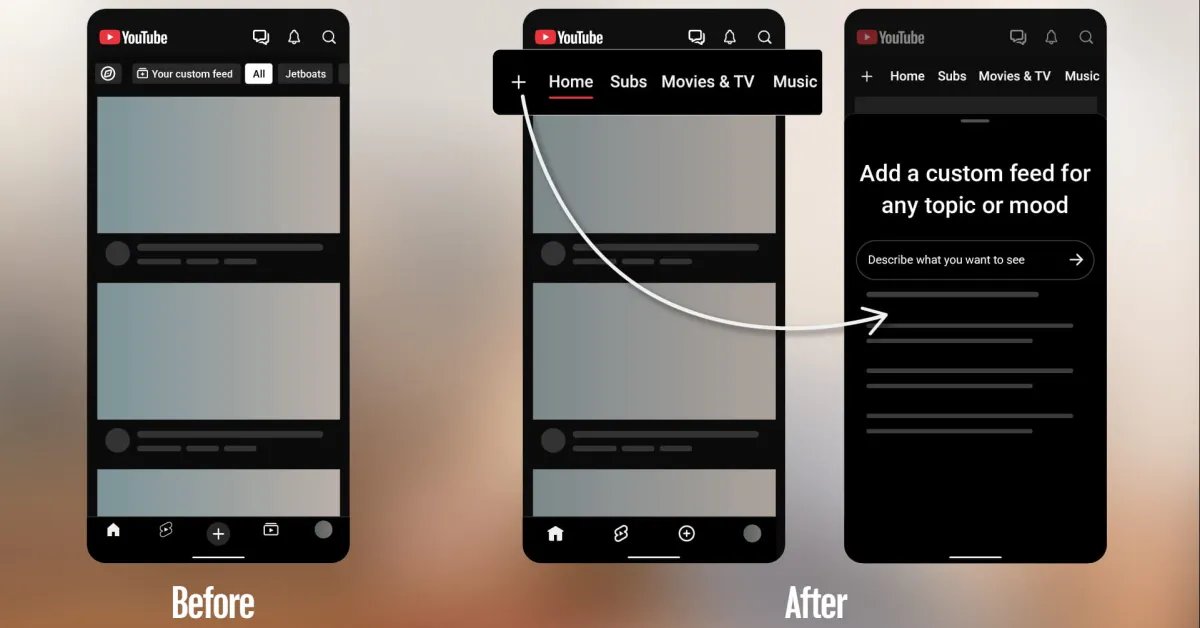
YouTube is initiating a substantial redesign of its mobile application interface on both Android and iOS platforms. This update, which follows a period of testing earlier this year, represents the most significant navigation change since the introduction of the bottom bar in 2017. The primary adjustment involves moving the “Subscriptions” tab from its long-standing position in the bottom navigation bar to a new, prominent location within the top navigation bar on the “Home” tab.
For millions of users, this modification will require a shift in established muscle memory. The Subscriptions button, previously a fixture at the base of the screen for nearly a decade, now sits in the second position within the Home interface, marked by a distinctive red underline. This move is part of a broader strategy by YouTube to consolidate content discovery and streamline the user experience by reducing reliance on the traditional navigation drawer.
Consolidated Navigation and Specialized Feeds
In addition to relocating the Subscriptions tab, the update introduces a new row of dedicated, context-aware feeds at the top of the Home interface. Once the user navigates past the Subscriptions tab, the top bar now displays specialized categories, including Live, Music, and Movies & TV. The visibility of these categories is dynamic; for example, the Movies & TV section will only appear for users who have active subscriptions, such as those through Primetime Channels.
By elevating these sections to a top-level horizontal scroll, YouTube aims to provide more immediate access to specific media formats. This design choice effectively pushes the content closer to the surface, potentially increasing engagement with vertical-specific features like live streaming and long-form entertainment libraries without requiring users to dig through sub-menus or the primary navigation drawer.
The Introduction of Custom Feeds
Perhaps the most technical addition accompanying this interface refresh is the launch of “custom feeds.” This feature empowers users to define their discovery parameters in their own language. By tapping the “+” button located at the top of the Home feed, a user can input a descriptive request, such as “suggest tutorials for beginner photography under 15 minutes” or “content about space exploration and physics.”
The system then generates a bespoke feed tailored to those specific criteria. These custom feeds are not fleeting; they sync across both mobile and desktop platforms, allowing users to return to their curated streams at any time. Once created, these feeds appear as additional tabs in the top navigation bar, sitting alongside Home and Subscriptions. This mechanism functions as a localized recommendation engine, allowing viewers to slice their consumption habits into distinct, manageable segments based on specific moods or interests rather than relying solely on the broad algorithmic feed.
Tiered Access and Feature Limitations
YouTube has implemented a tiered structure for the management of these custom feeds, creating a clear distinction between standard users and those who pay for a premium subscription. Free users are limited to saving up to three active custom feeds at any given time. Conversely, YouTube Premium members are granted the capacity to save up to eight active feeds.
This tiered approach serves as a clear incentive for heavy platform users to consider a subscription, as those who engage with a diverse range of topics will likely find the three-feed limit restrictive. By limiting the number of saved feeds, YouTube encourages users to refine their choices, ensuring that the saved content remains highly relevant to their current preferences.
Strategic Implementation and Availability
The rollout of these features is currently restricted to signed-in, English-speaking users based in the United States. This deployment strategy is typical for major interface updates, allowing the engineering team to monitor data, gather user feedback, and refine the recommendation accuracy of the custom feeds before a broader international release.
The removal of the navigation drawer and the move toward a top-heavy, tab-based navigation system signal a pivot in how YouTube prioritizes user attention. By placing primary control over content discovery in the hands of the user through custom feeds while keeping essential channels like Subscriptions and Live easily accessible, the platform is attempting to solve the problem of information overload. As the update continues to propagate globally, the impact on creator discovery and overall watch time will be measured against the historical reliance on the standard, non-customized algorithmic feed. Whether users will embrace this shift remains to be seen, but the update represents a decisive step toward a more modular and personal digital environment.
Disclaimer: This content is auto-generated for informational purposes only.
Source: Read Original News