
Every year, lakhs of aspirants apply for government jobs in Madhya Pradesh, Uttar Pradesh, Rajasthan, and Chhattisgarh. They prepare hard studying general knowledge, mathematics, and reasoning. But many of them get stuck at one unexpected hurdle: the Hindi typing test.
Hindi typing is not just a formality. In many state-level recruitment processes, it is a mandatory qualifying component. Fail the typing test and your written exam score does not matter. But here is the good news Hindi typing for government jobs follows a predictable pattern, and with the right preparation strategy, it is very much something you can master.
This guide covers everything: which keyboard layout to learn, which font to use, how government portals process your text, and how tools like a KrutiDev to Unicode converter play a practical role in your day-to-day preparation.
Why Hindi Typing Is Still Mandatory for Government Jobs
You might wonder: in 2025, why do government departments still test Hindi typing? The answer is simple. Millions of official documents, notices, RTI responses, court orders, and administrative records are written in Hindi every single day across Indian state governments. Clerks, data entry operators, stenographers, and patwaris need to type accurately in Hindi fast.
The typing test is the most direct way to measure this skill before recruitment. It filters out candidates who cannot handle the real workload of a government desk job. So if your dream is to work in state administration, learning Hindi typing is not optional it is the job.
KrutiDev or Mangal? Which Font Should You Learn?
This is the first question every aspirant asks, and the answer depends on which exam you are targeting.
KrutiDev (Remington Layout)
KrutiDev uses the Remington keyboard layout the same layout that Hindi typewriters used for decades. Because government offices across North India trained their staff on Remington typewriters, this layout became the default standard for state-level exams. If you are preparing for CPCT, MP Vyapam, Rajasthan Patwari, or UPSSSC exams, you will most likely be typing in KrutiDev 010.
The Remington layout feels unnatural at first keys do not follow any phonetic logic. But once your fingers learn the positions through repetition, it becomes fast and reliable. Most experienced government typists in North India use this layout.
Mangal (Inscript Layout)
Mangal is a Unicode font that uses the Inscript keyboard layout a phonetically organized layout standardized by the Government of India. Central government exams, SSC typing tests, and IBPS have moved to Mangal and Unicode as their official standard.
Inscript is generally considered easier to learn from scratch because keys map to phonetic sounds. However, if you have already learned Remington, switching can be disorienting.
Practical tip: Check the official notification for your target exam carefully. It will specify which layout and font is accepted. Many state exams accept both Remington (KrutiDev) and Inscript. For central government exams, Mangal/Unicode is the standard.
The KrutiDev Font Problem Nobody Talks About
Here is something that surprises many aspirants when they first learn about it: KrutiDev does not store real Hindi characters. It stores English ASCII codes and relies on the font file to display them as Devanagari letters. That works perfectly on a computer where KrutiDev is installed. But paste that same text into a government portal, email, or WhatsApp message, and it turns into complete garbage random symbols and English letters where your Hindi words should be.
This is not a bug. It is how the font was designed, back in an era before the internet existed. The problem is that modern platforms websites, online application forms, government portals all run on Unicode. They expect real Devanagari characters, not ASCII codes dressed up as Hindi.
This is why knowing how to convert KrutiDev to Unicode has become a practical skill for every government job aspirant and employee. You type in KrutiDev for the exam. You submit in Unicode for the portal. The two worlds are different, and you need to be able to move between them.
Government Exams That Require Hindi Typing State by State
Madhya Pradesh
• CPCT (Computer Proficiency Certification Test): Mandatory for most MP government jobs involving computers. Tests Hindi typing in KrutiDev or Inscript with specific word-per-minute requirements.
• MP Vyapam: Various posts including Data Entry Operator, Clerk, and Patwari require Hindi typing proficiency.
Uttar Pradesh
• UPSSSC: Online application forms strictly require Unicode text. Candidates who fill forms using KrutiDev get errors on submission.
• UP Police and Revenue Department: Computer operator and clerical positions regularly include a Hindi typing component.
Rajasthan
• RSMSSB Patwari: The Rajasthan Patwari exam includes a Hindi typing test. KrutiDev is widely used for preparation in this state.
• Rajasthan High Court Clerk: Requires accurate Hindi typing with both speed and accuracy benchmarks.
Central Government
• SSC (Staff Selection Commission): Uses Mangal font (Unicode) for Hindi typing. Remington layout is accepted as an input method.
• IBPS Clerk and Specialist Officer: Hindi typing tests use Unicode standard. Candidates must be comfortable with both input and output in Unicode.
How to Build Genuine Hindi Typing Speed and Accuracy
Speed comes from muscle memory. Accuracy comes from understanding the keyboard layout deeply enough that you stop thinking about individual key presses. Here is a realistic approach to building both:
Start with the home row.
Every keyboard layout has a home row the row where your fingers rest. Learn to type every character reachable from the home row without looking at the keyboard. Do not move to other rows until this is automatic.
Drill problem characters daily.
In KrutiDev, the i-matra (ि) must be typed before the consonant it belongs to, even though it appears to the left visually. Conjunct consonants like क्ष, त्र, and ज्ञ require multi-key sequences. These are the characters that break accuracy for most candidates. Spend 10 minutes every day drilling only these difficult combinations.
Use real exam passages for practice.
Do not invent your own practice material. Use actual passages from past CPCT or state exam papers. The vocabulary, sentence structure, and character distribution in exam passages is different from casual Hindi. Practicing with the right material trains you for the right thing.
Verify your output with a converter.
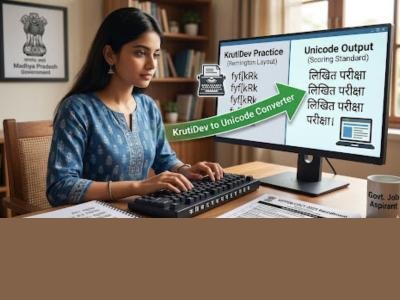
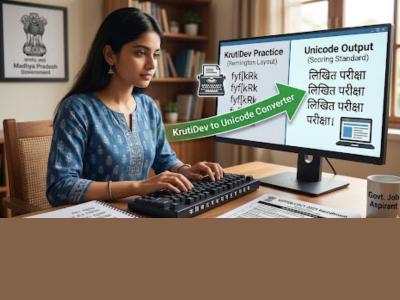
After each practice session, paste your typed KrutiDev text into a converter like krutidev-to-unicode.com and read the Unicode output carefully. If the converted text matches the original passage word for word, your typing is accurate. If you see wrong matras, missing half-characters, or incorrect conjuncts, those are exactly the errors the exam system will penalize. Catching them in practice costs you nothing. Missing them in the exam costs you the job.
Track word count every session.
Most Hindi typing exams have a minimum word count requirement per passage. Train yourself to hit that target consistently. A converter with a built-in real-time word counter removes the need to count manually and lets you focus entirely on typing.
What the Exam System Actually Does With Your Typing
This is something most coaching institutes do not explain clearly. When you type in KrutiDev on a government exam portal, the system does not evaluate raw keystrokes. It converts your KrutiDev input to Unicode and then compares the Unicode text against the target passage character by character.
This means that if your KrutiDev typing produces incorrect Unicode even for one character that character is counted as an error. A missing half-character, a wrong matra, or an incorrect conjunct all register as mistakes in the final score, even if your fingers hit the right keys according to your own understanding of the layout.
Practicing with a KrutiDev to Unicode converter replicates this exact evaluation process. You see the same Unicode output that the exam system would generate from your typing. There is no better preparation than that.
Final Thoughts
Hindi typing for government jobs is a learnable skill and one that directly separates candidates who clear the typing test from those who do not. The path is straightforward: learn the right keyboard layout for your target exam, practice with real exam passages, verify your output using a Unicode converter, and correct your errors systematically.
The technical gap between KrutiDev and Unicode is real, but it is not something that should hold you back. Once you understand how the two systems relate to each other and how to move between them you have a significant advantage over candidates who are still guessing why their text looks broken on online portals.
Tools like krutidev to unicode https://krutidev-to-unicode.com/ exist precisely to close that gap giving aspirants a fast, accurate, browser-based converter with a built-in word counter, no installation required, and complete privacy for your practice material. Use it every day, and the typing test will stop being a hurdle and start being the easiest part of your government exam preparation.
United State
At Seo Valley Hub , we help brands grow authority and visibility through high-quality guest posts on real websites and high-quality press release sites. Every placement comes with strong DA, DR, real organic traffic, and natural link profiles-all delivered at fair and competitive pricing.
This release was published on openPR.