








Google Refines Camera Experience on Pixel 11 with New ‘Quick Access’ Controls
The Google Pixel camera experience is evolving with the launch of the Pixel 11 series. With the arrival of camera version 11.0, Google has introduced a redesigned "Quick Access" control system, aiming to provide users with more granular, on-the-fly adjustments while shooting. However, early impressions suggest that while the functionality is robust, the implementation may take some getting used to.
A New Look for Custom Controls
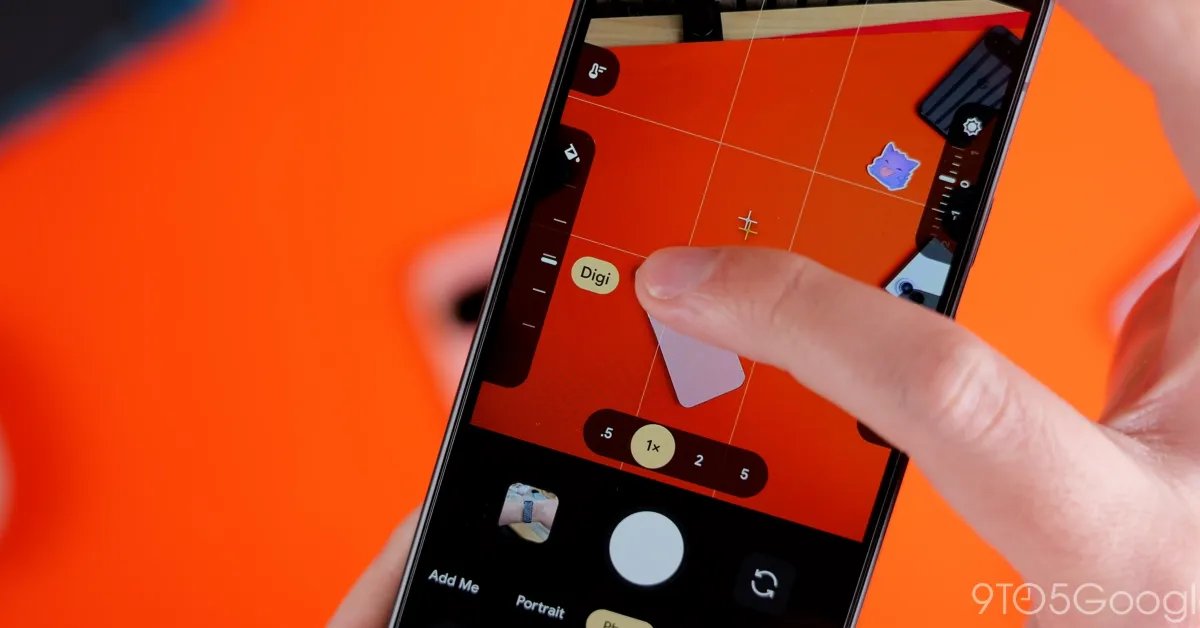
While the "Quick Access" feature was first introduced in late 2024, the Pixel 11 iteration brings a significant visual and functional overhaul. Gone are the oversized slider bars of the past, replaced by more refined slider dials. These dials appear on both sides of the screen, allowing for quick adjustments to specific settings—including the new "Looks" feature exclusive to the Pixel 11.
Customization of these dials is handled within the camera’s settings menu. To access this, users must navigate to the settings via the overflow button located on the left side of the UI. While functional, the process is somewhat convoluted, requiring several taps to reach the customization panel.
Hidden in Plain Sight
A notable quirk of this new interface is that it remains hidden by default. In fact, on our test units, the feature was disabled entirely out of the box, requiring users to manually enable it.
Even when active, the sliders are not permanently visible on the viewfinder. Users must tap the screen to summon the dials, a design choice that adds a layer of friction to the workflow. Without a persistent indicator of their presence, users might find the feature unintuitive. A potential improvement for future updates would be a toggle to keep the sliders visible at all times, perhaps in a condensed, unobtrusive state.
More Control at Launch
Beyond the sliders, the Pixel 11 camera update introduces a new "Launch mode" setting. This allows power users to configure the camera app to open directly into a preferred state, such as Video mode or the new Magic Capture, bypassing the default photo mode.
The mechanics of the sliders themselves are straightforward: users can slide up or down to adjust their chosen setting, with a convenient undo button appearing at the bottom of the screen should they wish to revert changes. While the interface lacks text labels, it displays the specific values as adjustments are made, keeping the screen clean while providing necessary feedback.
Future Rollouts
As is typical with Google’s software updates, this refined UI is currently debuting on the latest hardware. Given that existing devices are currently running version 10.4 of the camera app, it is highly likely that these features—or at least a variation of them—will eventually make their way to older Pixel models in a future software update.
For now, Pixel 11 users have early access to this more tactile, albeit hidden, way of interacting with their device’s camera, setting the stage for a more personalized photography experience.