








The Challenge of Dual-Display Navigation
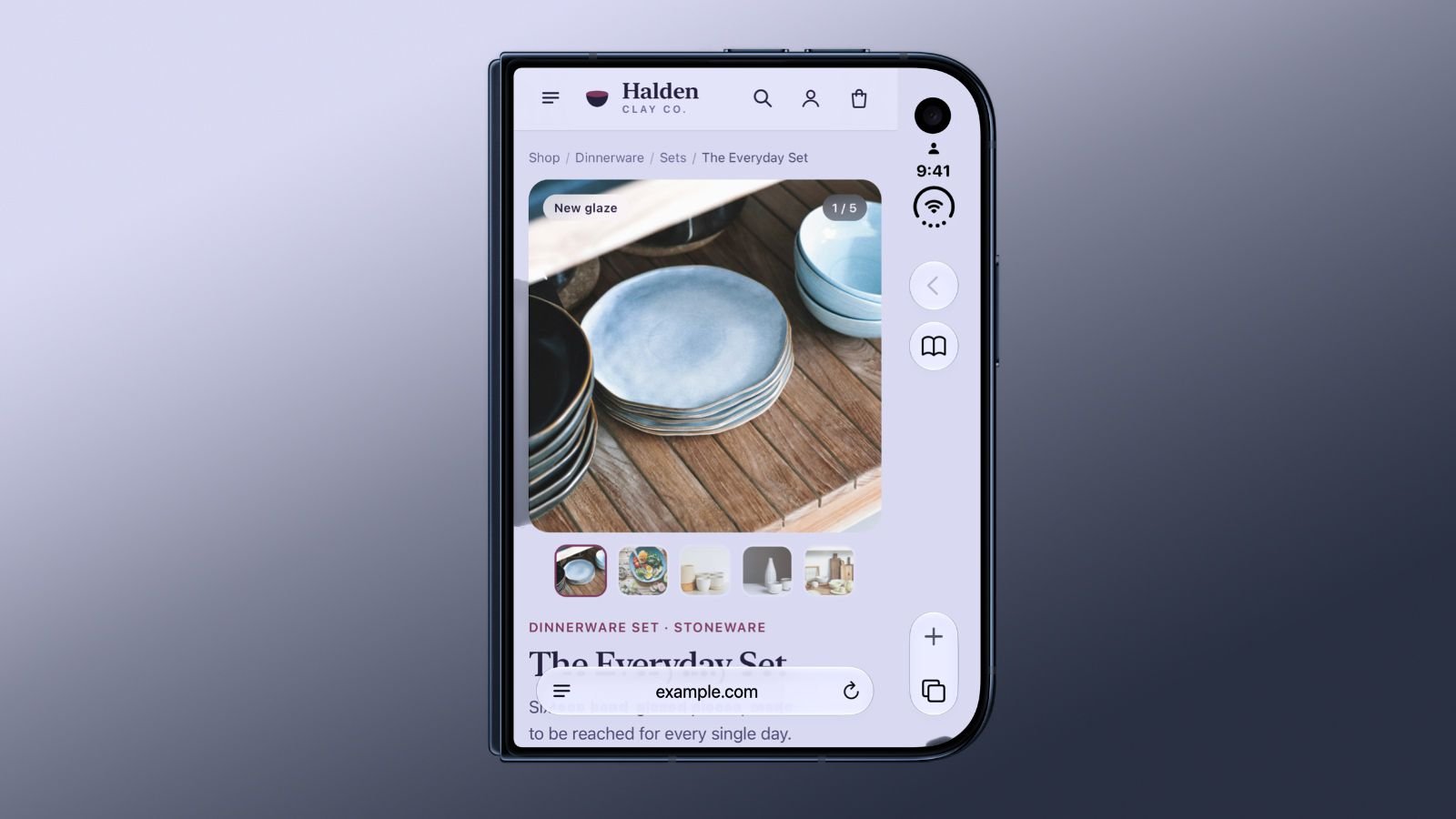
The introduction of the iPhone Duo represents a significant shift in mobile hardware architecture. Unlike the vertical, slab-based interface common to smartphones over the last two decades, the Duo features a unique display configuration that prioritizes horizontal space. To accommodate this, Apple positioned browser controls along the side of the screen, creating a dedicated strip of interface space that remains separate from the primary content area. While this design preserves vertical height, it creates a technical barrier for the WebKit engine: the browser currently reserves a physical portion of the screen for these controls, preventing web content from extending into that specific boundary.
As a result, websites viewed on the iPhone Duo appear with a permanent, color-matched strip running along the side, which limits the effective width of the rendering environment. Apple is currently evaluating methods to bridge this gap, allowing content to spill over into the area beneath the side-mounted interface. The objective is to increase the usable screen real estate without compromising the user’s ability to interact with essential navigation elements or interactive buttons.
Technical Hurdles and the viewport-fit Standard
At the center of this investigation is the existing web standard known as viewport-fit. This CSS property allows developers to control how a webpage scales relative to the viewport. Specifically, the “cover” setting instructs the browser to extend the content area into the device’s safe areas—the regions typically reserved for notches, home indicators, or system-level hardware interfaces.
While the “cover” property is already supported, Apple’s research indicates that it is not a viable immediate solution for the iPhone Duo. When websites enable this feature without specific, device-aware adjustments, critical UI components often become obscured by the browser’s side-mounted controls. Because many developers do not consistently apply padding or margin adjustments for every edge of the screen, simply forcing an expansion would render a significant number of web pages broken or difficult to navigate. Apple’s challenge is to balance the request for more screen space with the reality that current web architecture relies on predictable, unobstructed rendering rectangles.
Potential Solutions for Responsive Web Design
Apple is exploring a middle ground that provides developers with granular control over how content interacts with hardware-specific overlays. One proposed methodology involves separating the background layer from the foreground content layer. In this scenario, a website could allow its background color or decorative imagery to extend across the entire screen, including the strip currently occupied by Safari’s controls, while restricting text, links, and forms to the “safe” zone.
This architectural shift would require a new set of CSS environment variables or a specific extension to the viewport meta tag that alerts the browser to distinguish between aesthetic elements and functional content. By creating a layered approach, Apple intends to prevent the user experience from suffering when a site expands its layout. This would ensure that while a website looks expansive and visually integrated with the unique hardware of the iPhone Duo, its usability remains intact.
Evolving Interface Behavior in Safari 27.1
The recent release of Safari 27.1 marks the first significant iteration of the browser tailored for this dual-screen form factor. While the research into side-control overlays continues, the update introduces immediate functional improvements that utilize the device’s unique physical posture. One notable addition is the two-page PDF viewing mode. By leveraging the internal sensors of the iPhone Duo, Safari can detect when the device is held at a partial angle, simulating the behavior of a physical book. In this orientation, the software automatically splits the PDF view, rendering two pages side-by-side to take full advantage of the internal hinge and screen real estate.
Once the device is flattened or fully closed, the software seamlessly reverts to a single-page view. This demonstrates a shift in how Safari handles document rendering, moving away from static window sizes toward dynamic, posture-aware layouts.
Experimental Features and Future Development
For developers looking to prepare their websites for the evolving nature of the iPhone Duo, Safari 27.1 provides several experimental feature flags. These tools allow testers to interact with the device’s hinge sensors directly through web APIs. By detecting the specific folding posture of the hardware, developers can build layouts that respond in real-time, such as centering content around the device’s middle fold or creating a “book-like” interface that respects the physical divide between the two displays.
These experimental flags act as a sandbox for the future of mobile web development. As Apple continues to investigate how to reconcile the side-mounted control strip with responsive web design, these APIs serve as the foundation for a new era of fluid mobile interfaces. For now, the proposed changes remain under heavy scrutiny; Apple’s engineering teams are prioritizing stability and accessibility, ensuring that whatever change is ultimately implemented does not break the existing web ecosystem. Users and developers alike can expect these features to mature as more hardware-specific API implementations are tested in subsequent Safari updates, ultimately defining how software interacts with non-traditional display geometries.
Disclaimer: This content is auto-generated for informational purposes only.
Source: Read Original News