







Streamlining Device Control with PhoneBox
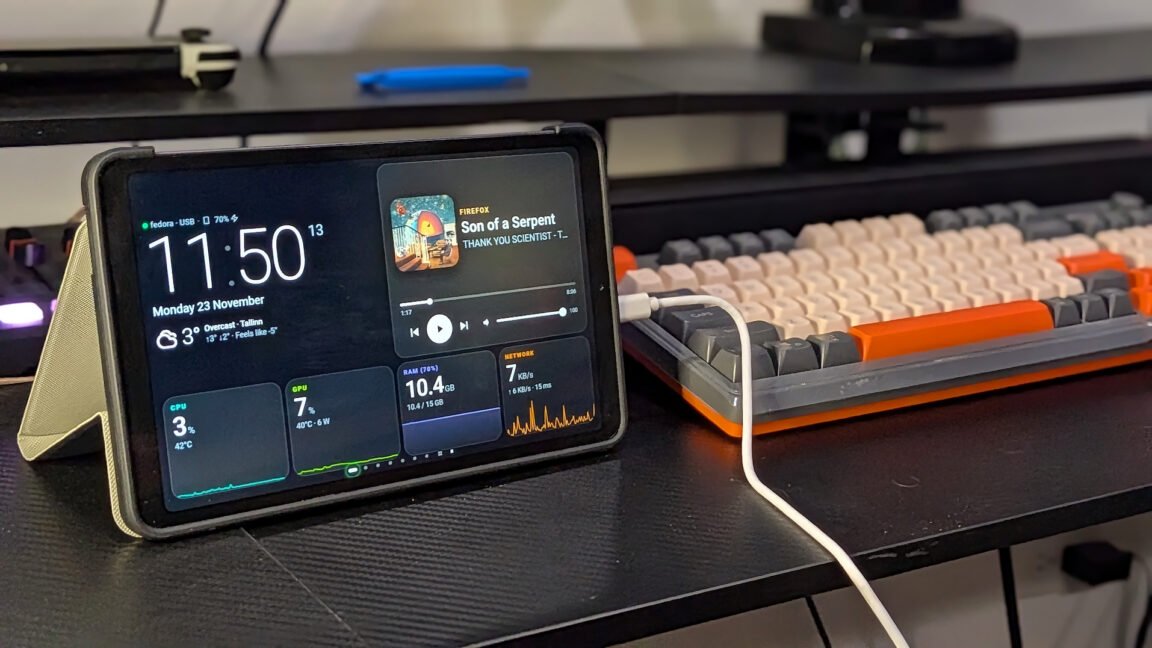
PhoneBox is emerging as a compelling solution for users looking to repurpose tablets and smartphones into dedicated control surfaces for their primary workstations. By acting as a secondary dashboard, the software bridges the gap between a PC’s powerful computing environment and the immediate, tactile accessibility of a handheld touch device. The system allows users to offload specific tasks—such as launching Steam titles, monitoring system health, or controlling smart home ecosystems—to a peripheral screen, effectively decluttering the primary monitor.
The architecture of PhoneBox relies on a dual-component setup: a companion application running on the host PC and an interface client on the mobile device. This structure ensures that heavy processing remains on the workstation, while the mobile screen acts as a responsive, real-time visual controller. With a catalog currently boasting over 130 widgets, the potential for customization is substantial. Users can tailor their secondary displays to show exactly what they need, whether that involves complex macro buttons for creative software or basic system metrics like CPU temperature and RAM usage.
Simplified Configuration and Deployment
One of the platform’s primary strengths is its centralized management system. Configuration is handled entirely through a web interface hosted on the PC, which pushes updates to the connected device instantaneously. This design choice removes the need to navigate cumbersome menus on the smaller mobile screen, allowing for rapid layout adjustments. Adding a new widget is as straightforward as selecting it from the library and saving the configuration; the changes appear on the connected tablet without requiring a manual refresh or software restart.
This streamlined workflow is particularly beneficial for users with specialized needs. For instance, creating a custom Steam library launcher on a tablet allows a gamer to trigger titles without tabbing out of an active application on their main monitor. Similarly, integrating Home Assistant controls provides a dedicated home automation panel that remains active even when the primary workstation is locked or occupied with full-screen work. The speed at which these widgets synchronize highlights the efficiency of the underlying communication protocol between the host and the client.
Navigating Initial Setup Challenges
While the user experience during operation is fluid, new users should anticipate some minor hurdles during the initial deployment phase. Currently, the Windows companion application is unsigned, which triggers a security notification from Microsoft SmartScreen during installation. This is a common occurrence with emerging or open-source software, but it requires users to manually override the security prompt to proceed.
Furthermore, the configuration hierarchy can be slightly counterintuitive for those accustomed to settings being localized to specific widgets. For example, adjusting regional data—such as weather information—is handled through the general user preferences menu rather than the widget’s individual settings panel. While this method keeps individual widgets lightweight, it requires a brief period of orientation for users to locate specific configuration parameters.
Wireless Connectivity and Troubleshooting
The connectivity landscape for PhoneBox currently favors wired configurations. While the software documentation outlines a wireless setup process using QR codes to pair mobile devices via a web link, this feature exhibits some variability in practice. Attempts to pair via standard camera-based QR scanning can encounter friction depending on the specific mobile device’s camera software and browser interaction.
For users who prioritize a clean, wireless desk environment, it is worth noting that the documented path assumes a seamless link between the camera app and the PhoneBox pairing URL. If the mobile device fails to interpret the QR code as a trigger for the application, the setup process can stall. Because of this, the USB-based connection remains the most reliable path for ensuring a persistent, low-latency connection. Users planning to rely strictly on a wireless configuration should be prepared to troubleshoot their specific device’s handling of link-based QR redirects.
Impact on Workflow and Ergonomics
The broader impact of adopting a solution like PhoneBox is the improvement in digital ergonomics and focus. By delegating system monitoring and repetitive launching tasks to a side-panel, users can maintain a cleaner digital workspace. The ability to glance at a secondary device to verify system performance or toggle a smart light provides a sense of control without requiring the user to switch active windows.
As the platform matures and the widget library expands, the reliance on such secondary control surfaces is likely to grow among power users, developers, and enthusiasts. Despite the minor inconveniences involving installation security and wireless pairing, PhoneBox provides a highly functional, responsive framework for extending the utility of idle mobile hardware. It represents an efficient, low-cost method for transforming a discarded tablet into a professional-grade control deck, proving that small tweaks to a workspace setup can yield significant gains in daily productivity.
Disclaimer: This content is auto-generated for informational purposes only.
Source: Read Original News