









Enhanced Web App Flexibility in Chrome 155
The release of Chrome 155 marks a significant shift in how users interact with websites on Googlebooks devices. Historically, the operating system restricted the ability to install websites as standalone applications to those that possessed a specific web manifest. This design choice ensured that only developers who explicitly optimized their sites for “app-like” behavior could offer a native-style experience. While this maintained a level of quality control, it left users unable to treat their most frequented websites as dedicated programs.
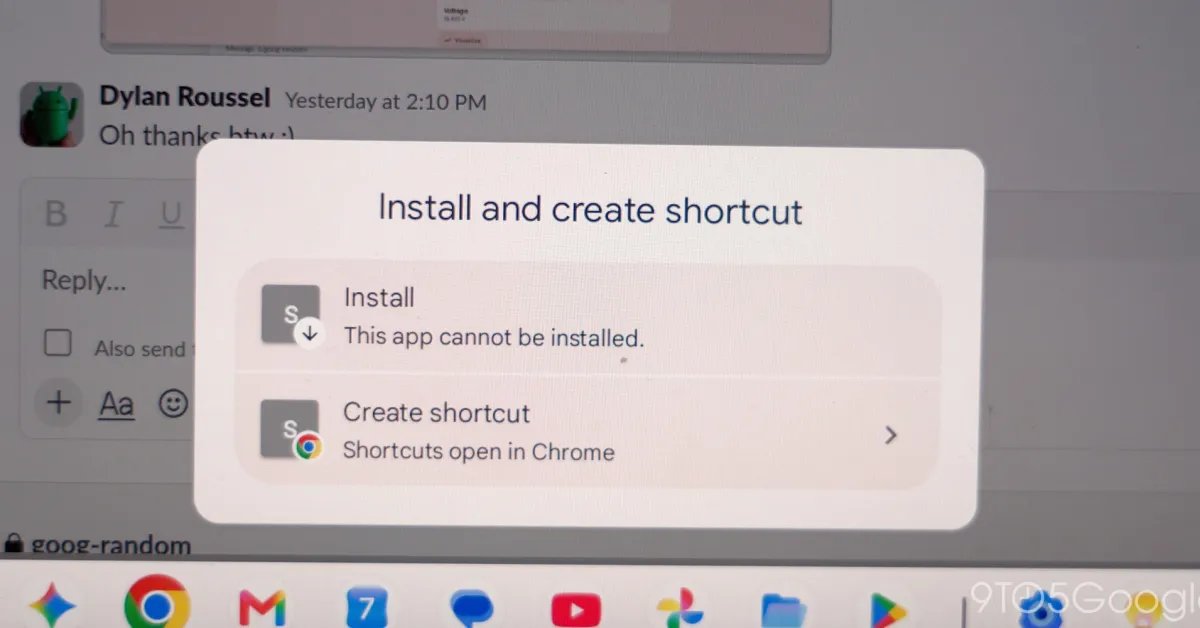
With the update to version 155.0.8059.79, Google has responded to community feedback by removing these barriers. Users can now manually trigger the installation process for any webpage, regardless of its underlying metadata. By transforming these pages into standalone instances, Chrome allows them to run in their own windows, effectively blurring the lines between standard browsing and installed software.
How to Manually Install Web Pages
The process for converting a regular webpage into an installed application is straightforward and integrated directly into the browser interface. To initiate the installation, users should navigate to the desired website within the Chrome browser on their Googlebook device. From there, the process is accessed via the Chrome menu, located at the top right of the screen.
Under the “Save and share” section, users will find the command “Install and create shortcut.” Once selected, the browser handles the necessary configurations to promote the page to an application state. In certain instances, depending on the specific site structure, an “Install” icon may appear directly in the address bar, providing a faster path to the same result. Once the installation is finalized, the site effectively functions as a standalone application, residing in the app launcher and capable of being managed like any other software package on the system. Google advises that for sites where users previously created simple browser-tab shortcuts, those older shortcuts should be removed to ensure the new application format functions correctly.
Deep System Integration and Performance
One of the primary benefits of this update is the level of integration afforded to these newly installed web apps. Once added to the system, these apps can be pinned directly to the taskbar or the homescreen, providing immediate access without the need to navigate through a browser interface. Because these applications are derived from the browser, they maintain a consistent environment by sharing Google Account login credentials, cookies, site permissions, and even installed browser extensions.
This shared architecture is technically advantageous. It ensures that users do not have to perform redundant authentication steps when switching from a browser-based workflow to an app-based one. Furthermore, by running in their own windows, these web apps provide a cleaner, focused workspace that is devoid of the standard browser address bar and tabs, which can often be a source of distraction during professional tasks.
Evolution of the Chrome Settings Interface
Beyond the improvements to web app management, Chrome 155 introduces a substantial change to the browser’s settings menu. Previously, the settings interface on Googlebooks occupied the full screen, consistent with mobile-optimized designs. While this was functional, it often hampered multitasking, as users were forced to toggle between their settings and the content they were attempting to modify.
The latest update transitions the settings menu to a tab-based interface, aligning it more closely with desktop browsing conventions. This adjustment allows users to keep the settings page open in one tab while referencing a web page or configuration document in another. By enabling this side-by-side view, the update simplifies the process of making complex adjustments, such as modifying privacy controls or managing data sync settings, without losing context. This change represents a broader move toward making the Googlebook browsing experience feel more like a traditional desktop environment, prioritizing productivity and ease of access.
Broader Impact on User Workflow
The cumulative impact of these updates is a more cohesive and customizable computing environment. By allowing users to define their own set of “apps” from the web, Google is enabling a highly personalized workflow. Professionals who rely on niche web-based tools that lack official application support can now create their own launchable shortcuts, reducing the time spent searching through active browser tabs.
This update serves as a reminder of the evolving nature of web standards. As web applications grow more sophisticated, the distinction between a “website” and an “application” continues to diminish. Chrome 155 demonstrates a commitment to this trajectory, providing the infrastructure for users to curate their own digital ecosystem. As these versions roll out via the Play Store to all compatible devices, the user base can expect a more fluid transition between managing the browser and utilizing the web as a primary platform for work and productivity.
Disclaimer: This content is auto-generated for informational purposes only.
Source: Read Original News