








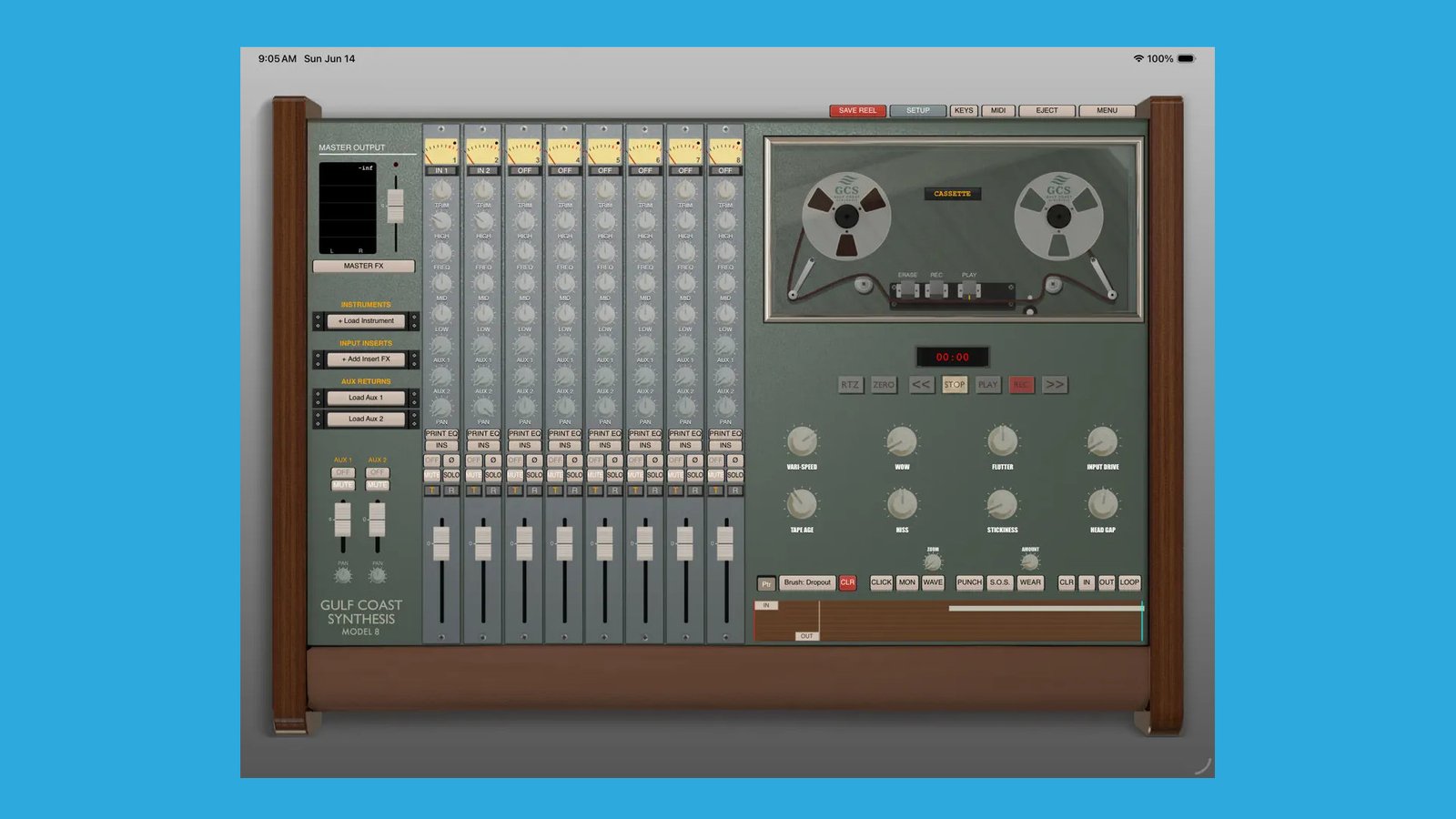
Gulf Coast Synthesis has released the GCS Model 8, a reel-to-reel machine-based studio environment for macOS, Windows, and iPadOS.
These days, you open your favorite DAW and start producing. It used to be different. Back then, you had to fire up the tape recorder to capture your instruments and jams. This had a special vibe, and this organic workflow remains popular even today.
For those who want to experience this without purchasing a vintage device, there’s now a kind of “DAW” based on reel-to-reel machines. Gulf Coast Synthesis has released the GCS Model 8.

GCS Model 8
It’s advertised as a DAW, but for me, it’s not quite that, as certain elements are missing. GCS Model 8 is a dedicated, standalone 24-track studio environment that transforms your macOS and Windows system or iPad into a vintage multitrack studio.
According to Gulf Coast Synthesis, the app replicates the physics and sonic characteristics of classic reel-to-reel machines like those from Ampex, 3M, TEAC, and Otari. It brings the organic workflow of analog recording to your mobile setup.
Functions like adjustable wow, flutter, stickiness, and head gap give you full control over these emulations. There are 24 tracks in total. You can work with all tracks on desktop computers like macOS and Windows.
Since the tracks use a lot of RAM, it’s somewhat more limited on iPadOS, especially with older hardware. They write:
- Standard iPads (3GB – 4GB RAM): Typically limited to 8 tracks for a 10-minute tape, or 16 tracks for a 5-minute tape.
- Pad Pro / M-Series (8GB+ RAM): Capable of running the full 24 tracks for 10 to 15-minute tape lengths.

More Than Just An Audio Recorder
Primarily, the GCS Model 8 allows you to record audio with the same workflow as on a vintage reel-to-reel machine. However, the software offers more than that.
Gulf Coast Synthesis also added virtual instruments like a polyphonic analog-style synth, a Glissandio expressive synth, a vintage drum machine, and others. Neat, you can also host your plugins (AUv3 on iPadOS), so you can record your favorite instruments right into it.
Alongside this, it has various built-in effects (Opto compressor, equalizer, etc.) and supports loading custom effect plugins.
Each track has its own dedicated channel strip with various controls: trim, EQ with high, mid, and low, two AUX routings, a panner, a level slider, and more.

Free vs Pro
On iPadOS, the GCS Model 8 is a free download. You can record, mix, and explore the tape physics engine. To enable project saving, exporting, and snapshots, you can unlock the Pro version with a one-time in-app purchase.
Since this is a RAM-based DAW, the developers strongly recommend testing the formats you plan to use, such as tape length and track count, before purchasing. Don’t forget: an iPad with limited RAM will be limited in the number of tracks.
CGS Model 8 First Impression
The Model 8 offers musicians an alternative to traditional DAWs, which I find interesting. It can inspire new ideas because the workflow is different. As a bonus, you get the wobbly factor of vintage recording devices.
GCS Model 8 is now available at an introductory price of $59,99 (down from $69,99), with a 10-day trial.
The iOS version is available as a free download on the Apple App Store. The in-app purchase is $14,99.
More information here: Gulf Coast Synthesis / Apple App Store