








Google Begins Rollout of ‘Motion Assist’ for Android 17 to Combat Motion Sickness
Following this week’s software update announcements, Google has officially begun the rollout of a new accessibility-focused feature for devices running Android 17: Motion Assist.
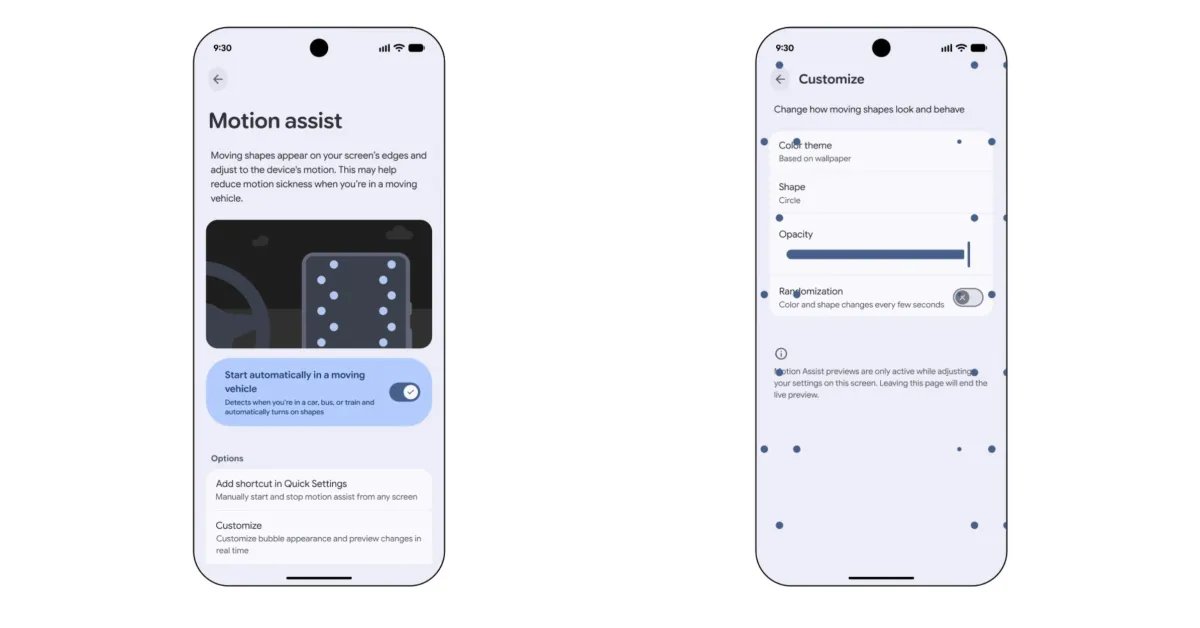
Designed to alleviate the discomfort of motion sickness while using a smartphone in a moving vehicle, the feature uses visual cues to help ground the user’s sensory perception. By displaying subtle, moving shapes that react to the device’s orientation and movement, Motion Assist helps mitigate the sensory mismatch that often causes nausea during travel.
How to Access Motion Assist
As the feature reaches more users, it can be located through the Android Settings app. Users can find it by navigating to Google > All services > Personal & device safety > Motion Assist. Alternatively, a simple search for “Motion Assist” within the main settings menu will direct you to the feature’s dedicated configuration page. The tool is integrated directly into Google Play services, appearing alongside existing safety utilities like Theft Protection and Advanced Protection.
Customization and Control
Google has provided a robust suite of customization options for the feature, allowing users to tailor the experience to their visual preference:
- Color: Users can select from set colors or choose a system-based theme.
- Shape: Options include circles, squares, pentagons, and diamonds.
- Opacity: A dedicated slider allows users to adjust how prominent the shapes are on the screen.
- Randomization: A toggle is available to keep the visual experience dynamic by changing shapes and colors every few seconds.
For power users, Google recommends adding a dedicated Quick Settings tile. This allows for manual activation or deactivation from any screen with a single tap. Once enabled, the system provides a persistent notification, ensuring that the feature can be toggled off instantly if no longer needed. The visual layout of these shapes automatically scales based on the hardware; for example, on the Pixel 11 Pro Fold, the system displays three columns of shapes, whereas standard phone displays utilize two.
Availability
While the feature is officially launching this week, it is not yet available to all users. The rollout appears to be a gradual, server-side update. Currently, those who have received the feature are running Google Play services version 26.33.32.
As the Android Motion Assist rollout continues, users are encouraged to check their system settings periodically. Given that the feature is tied to a server-side component, it may take several days before it appears on all compatible Android 17 devices.