










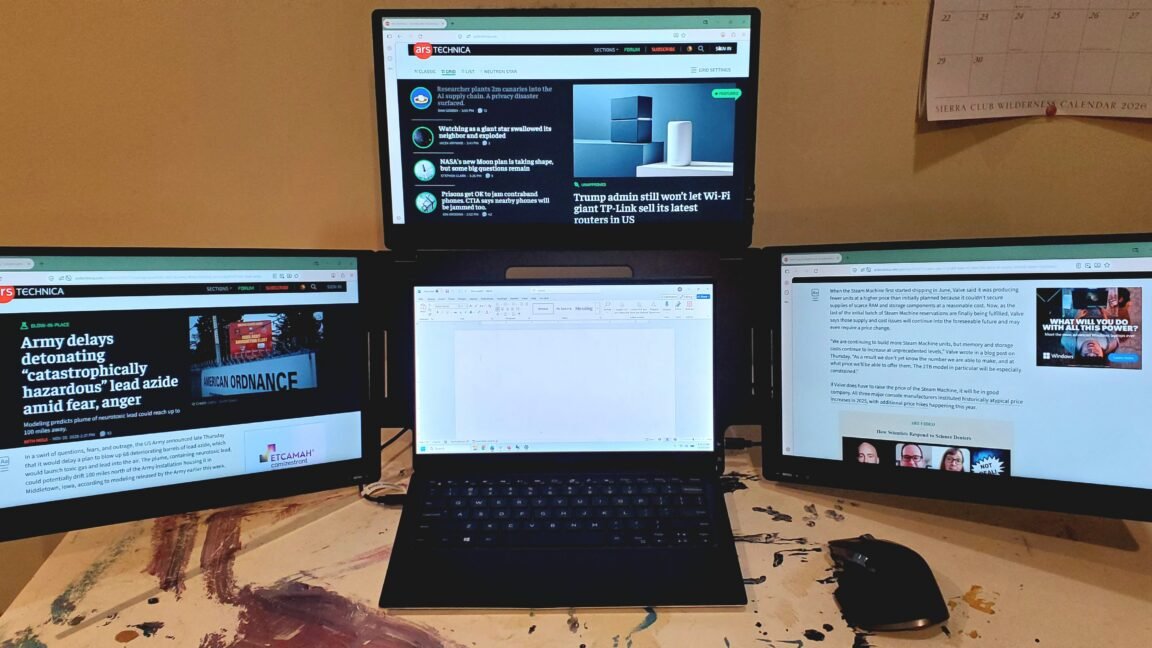
The modern mobile workspace demands high levels of productivity without sacrificing the compact nature of a laptop-centric setup. As workers transition between home offices, coffee shops, and corporate environments, the desire for multi-monitor arrangements has moved from desktop-only luxuries to portable necessities. The KYY X90G, a representative device in the burgeoning market of triple-portable monitors, illustrates both the promise and the practical limitations of this form factor.
Understanding the Hardware
The KYY X90G is designed to attach to a laptop, expanding the user’s view by providing two additional screens that flank the primary display. When fully deployed, the assembly spans approximately 46 inches. This width is a double-edged sword; while it offers an expansive workspace that can rival dedicated desktop stations, it also dictates the physical requirements of the user’s desk.
For those with limited surface area, this width can be problematic. Even when folding the side panels inward to create a more wrap-around layout, the hardware requires significant depth and breadth to remain stable. Furthermore, the weight is a critical factor for mobile professionals. At 6.4 pounds, the X90G is substantial—weighing more than twice as much as common ultralight laptops. While this weight is technically reasonable for three distinct display panels, it inherently reduces the portability that defines the device category.
Installation and Functional Convenience
One of the primary benefits of the X90G is the streamlined nature of its deployment. In many professional scenarios, the ability to transition from a single-screen laptop to a three-monitor workstation via a single USB-C cable offers a significant reduction in setup time. When a workspace is left organized, the “magical” aspect of this connectivity becomes evident, allowing users to move from a portable state to a multi-tasking powerhouse almost instantly.
The device includes an integrated kickstand and handle system, which assists in balancing the weight against the laptop’s screen hinge. However, potential users should be aware that the mechanical stress placed on a laptop’s display assembly when mounting such a device is a long-term consideration. The convenience of a one-cable connection relies heavily on the laptop’s port capabilities—specifically, it requires a USB-C port that supports power delivery and display output, or an auxiliary power source, to maintain functionality for all three panels.
The Compromise of Screen Fragmentation
A critical distinction exists between using a triple-monitor setup and using a single large, ultrawide panel. With the X90G, the user is operating three discrete screens. Because of the physical hinges required to fold the device, there is an inescapable gap between the displays. Furthermore, the geometry of the setup means that the panels are not always perfectly aligned with the primary laptop screen.
This configuration prevents the setup from functioning as a single, seamless, unified canvas. Instead, users must manage windows across fragmented zones. For data analysts or spreadsheet users who need to keep separate applications open and visible simultaneously, this is often a benefit. For creative professionals or those who require a contiguous visual flow, the mechanical breaks between the screens may prove distracting.
Versatility in Professional Use-Cases
Despite the challenges of fragmentation, the tri-screen layout offers capabilities that smaller, secondary monitors cannot match. For instance, in client-facing or collaborative settings, the device can be configured to share information across screens, allowing someone sitting across a table to view content on the outer panels. The X90G also supports vertical (portrait) orientation, which is highly effective for programmers writing code or copywriters drafting long-form documents.
This flexibility transforms the device into a modular tool rather than just an extension of the primary desktop. By rotating one of the panels, the user can optimize their vertical real estate, creating a specialized workflow that would be impossible with a standard dual-monitor setup or a simple portable tablet.
Evaluating the Practical Utility
Ultimately, the decision to invest in a triple-portable monitor comes down to the necessity of screen real estate versus the demand for mobility. If a user’s workflow relies heavily on managing multiple dashboards, communication channels, and active projects, the trade-off in weight and physical space is often justified. The X90G provides an efficient way to replicate a desktop environment in a transient or space-constrained setting.
Conversely, for users who prize a clean, minimalist environment or those who prioritize a lightweight bag over maximum monitor count, the triple-screen setup may feel like an unnecessary burden. The technology is clearly intended for a specific demographic—the “road warrior” who cannot sacrifice their multi-screen productivity, even when they are thousands of miles from their main desk. Before purchasing, users must ensure their primary laptop can support the power and display requirements, and that they have the physical desk surface to accommodate the 46-inch reach of the hardware. The X90G stands as a testament to how far portable hardware has evolved, even as it highlights that more screens do not always result in a simpler, less cluttered experience.
Disclaimer: This content is auto-generated for informational purposes only.
Source: Read Original News