









Engineering a Faster Xbox Experience
Microsoft has officially announced a significant overhaul of its Xbox application for Windows, targeting performance bottlenecks and navigation inefficiencies that have long hindered the user experience. By refining the underlying architecture, the company has successfully optimized launch times, reporting that the application now initiates up to 60 percent faster than its predecessor. This update is not merely a cosmetic refresh; it represents a fundamental shift in how the software interacts with the Windows ecosystem, aiming to provide a more cohesive experience for users who move between dedicated hardware and PC gaming environments.
The technical improvements extend throughout the application’s core modules. Navigation within the Home, Store, and Game Pass sections has been accelerated by up to 50 percent, while individual in-app window transitions are now 65 percent faster. According to Jason Beaumont, VP of Xbox experiences, these performance gains are the result of a concerted effort to streamline the application’s resource management. For the end user, this translates to reduced latency when switching between titles, accessing the storefront, or browsing game catalogs. The update is currently available to Xbox Insiders for rigorous testing, with a broader release cycle scheduled to follow.
Controller-First Navigation and Design
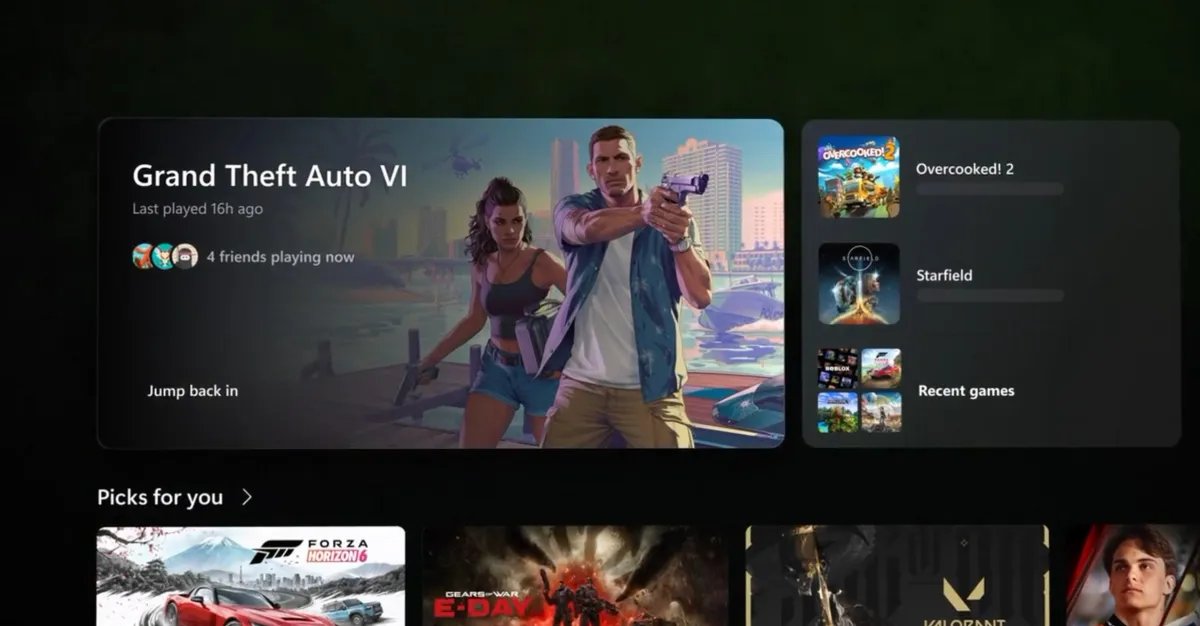
A primary driver behind this redesign is the rising popularity of handheld gaming PCs. With the emergence of various portable Windows devices, the existing Xbox app’s mouse-and-keyboard-centric interface became increasingly cumbersome. Microsoft has addressed this by implementing a simplified navigation system designed specifically for controller input. The new interface discards the cluttered, web-heavy aesthetics of the previous version in favor of a layout that behaves more like a native console dashboard.
This architectural shift replaces traditional web-based elements with a hybrid model that prioritizes fluid movement across menus using a gamepad. Search functionality, which previously caused input friction by triggering overlay windows, has been re-engineered to prevent accidental interruptions during navigation. The library section also benefits from this transition, featuring updated filtering logic and improved sorting mechanisms that make managing extensive digital game collections more efficient on smaller screens.
Integrated Social Features and User Interface
Social connectivity is a cornerstone of the modern gaming experience, and Microsoft has reorganized the app to prioritize community interaction. Friend lists are now prominently featured on the main dashboard, eliminating the need to navigate through secondary sub-menus to see who is online or to initiate a conversation. The inclusion of quick-access buttons for party management and text chat streamlines the process of coordinating multiplayer sessions.
Visually, the application has moved away from its legacy look, adopting a polished aesthetic that aligns with the current Xbox console dashboard. The game card interface has been entirely redesigned, utilizing updated animations and transitions that create a more tactile, responsive feel. By blending native rendering with optimized web components, Microsoft has managed to retain the flexibility of an application that updates regularly while achieving the snappiness expected of local system software.
Expanding the Unified Interface to Cloud and Web
The design philosophy applied to the Windows app is also migrating to the browser and cloud gaming platforms. Microsoft is currently rolling out a refreshed web experience for Xbox Cloud Gaming, ensuring that the visual language remains consistent whether a user is playing on a desktop, a smart TV, or a VR headset. This initiative seeks to eliminate the cognitive load associated with learning different interfaces across various hardware platforms.
The web-based version of Xbox Cloud Gaming introduces a dedicated library tab that aggregates games from both the user’s personal collection and the Game Pass catalog. To accommodate different hardware capabilities, the update includes a specialized desktop mode that maximizes screen real estate on larger displays. Furthermore, the accessibility suite has been expanded, offering users a choice between light and dark themes alongside five high-contrast modes. These accessibility features are designed to cater to a diverse range of visual needs, ensuring that the cloud gaming environment remains inclusive for all players.
Tailoring the Experience for Hardware Specifics
While the UI components are unified in their design language, Microsoft maintains that the experiences are not identical copies. The company acknowledges that the interaction requirements for a VR headset differ significantly from those of a standard PC monitor or a living room TV. Therefore, while the core navigation patterns—finding games, identifying playable content, and launching sessions—remain consistent, the specific implementations are customized for the unique constraints and capabilities of each device.
This multi-platform rollout signifies a strategic pivot toward a more hardware-agnostic gaming ecosystem. By standardizing the interface, Microsoft is positioning itself to provide a uniform service that bridges the gap between traditional console gaming and the increasingly fragmented world of PC and cloud-based hardware. As these updates permeate the Xbox ecosystem, the focus remains on the foundational promise: to provide a fast, simple, and recognizable gateway to digital content, regardless of the device used to access it. Future updates are also expected to refine the Game Bar interface on handheld devices, ensuring it achieves a degree of visual and functional synergy with the newly improved main application.
Disclaimer: This content is auto-generated for informational purposes only.
Source: Read Original News