








[
NEET PG 2026 City Intimation Slips Released: Key Dates, Download Process, and Image Correction Details
The National Board of Examinations in Medical Sciences (NBEMS) officially released the NEET PG 2026 city intimation slip on August 11, 2026. This crucial update allows all registered candidates for the postgraduate medical entrance test to ascertain their allotted examination city, facilitating their logistical planning well in advance of the examination date.
Candidates can now log in to the official NBEMS portal to view and download their respective city intimation slips. It is important to note that this slip is solely for travel and accommodation planning and does not serve as an entry pass to the examination hall. The precise examination centre details, along with reporting times, will be made available through the admit card, scheduled for release later this month.
NEET PG 2026 Important Dates
| Event | Date |
| City intimation slip release | August 11, 2026 |
| Final image correction window | August 12 to August 15, 2026 |
| Admit card release | August 27, 2026 |
| NEET PG 2026 examination | August 30, 2026 |
| Result declaration deadline | By September 30, 2026 |
How to Download the City Intimation Slip
Candidates can securely access their city intimation slip by following these straightforward steps:
- Visit the official NBEMS website at natboard.edu.in.
- Navigate to the “Examinations” tab and select “NEET-PG.”
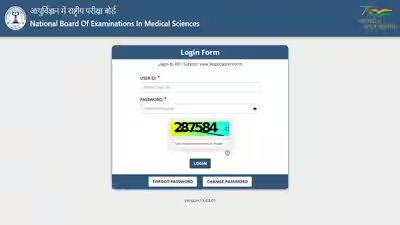
- On the NEET-PG page, locate the “Application” tab and click “Login.”
- Enter your User ID and Password in the designated fields.
- Once logged in, click on the “City Intimation Slip” link available on your dashboard.
- Download and save the PDF document for your records and for planning purposes.
NBEMS is also proactively sending city allotment updates to candidates via their registered email IDs. If you do not find the email in your primary inbox, candidates are advised to check their spam or promotions folders.
Understanding the City Intimation Slip
It is crucial to understand that the city intimation slip serves a specific purpose: to inform candidates of their assigned examination city. It does not contain the exact address of the test centre, reporting time, or examination slot. These vital details will be exclusively mentioned on the admit card, which is scheduled for release on August 27, 2026. The city intimation slip will not grant entry to the examination venue under any circumstances.
Recovering Login Credentials
For candidates who may have misplaced or forgotten their User ID or Password, NBEMS provides convenient recovery options. Below the login fields, recovery links are available. Candidates can initiate recovery by providing their registered email ID or Application Number and then choosing between OTP-based recovery via their registered mobile number or receiving an email reset link.
Note: The email reset link is valid for a limited period of 30 minutes. When setting a new password, ensure it meets the security criteria: 8 to 16 characters, including at least one uppercase letter, one number, and one special character.
Final Image Correction Window Opens Soon
A final opportunity for image correction will be available through the “Final Selective Edit Window.” This window opens on August 12, 2026, at 1:00 PM and will close on August 15, 2026, at 11:55 PM. This facility is specifically for candidates whose application images were identified with deficiencies during scrutiny.
During this period, candidates can only rectify issues related to their passport-size photograph, signature, and left thumb impression. It is important to remember that personal details, chosen test cities, and academic information cannot be altered at this stage.
Candidates can check the status of their submitted images under the “Image Scrutiny” or “Scrutiny” tab on the portal. Common issues that require correction include blurry photographs, signatures made with blue ink, smudged thumb impressions, or photographs with unsuitable dark backgrounds. Candidates are strongly advised to refer to the detailed specifications provided in the Information Bulletin, specifically on pages 110–127, to ensure their corrections meet the required standards.