







Bypassing the Flash: A New Frontier in GPU Customization
The landscape of GPU enthusiast hardware tuning has fundamentally shifted with the introduction of a new suite of software tools developed by the user known as Panchovix. For years, the ability to modify an NVIDIA graphics card’s Video BIOS (VBIOS) was constrained by stringent security measures, including digital signature verification that prevented users from flashing customized firmware to their hardware. These new utilities bypass the physical flashing process entirely, offering a sophisticated method to inject modified VBIOS images directly into the hardware initialization phase.
By moving away from physical writes to the GPU’s onboard flash chip, these tools eliminate the primary risk associated with traditional modding: the possibility of “bricking” a card due to a failed flash or a corrupted BIOS image. Instead, the modifications are handled via software overrides in the operating system, allowing users to revert to stock performance parameters with a simple reboot or by disabling the loader utility.
The Mechanics of VBIOS Modification
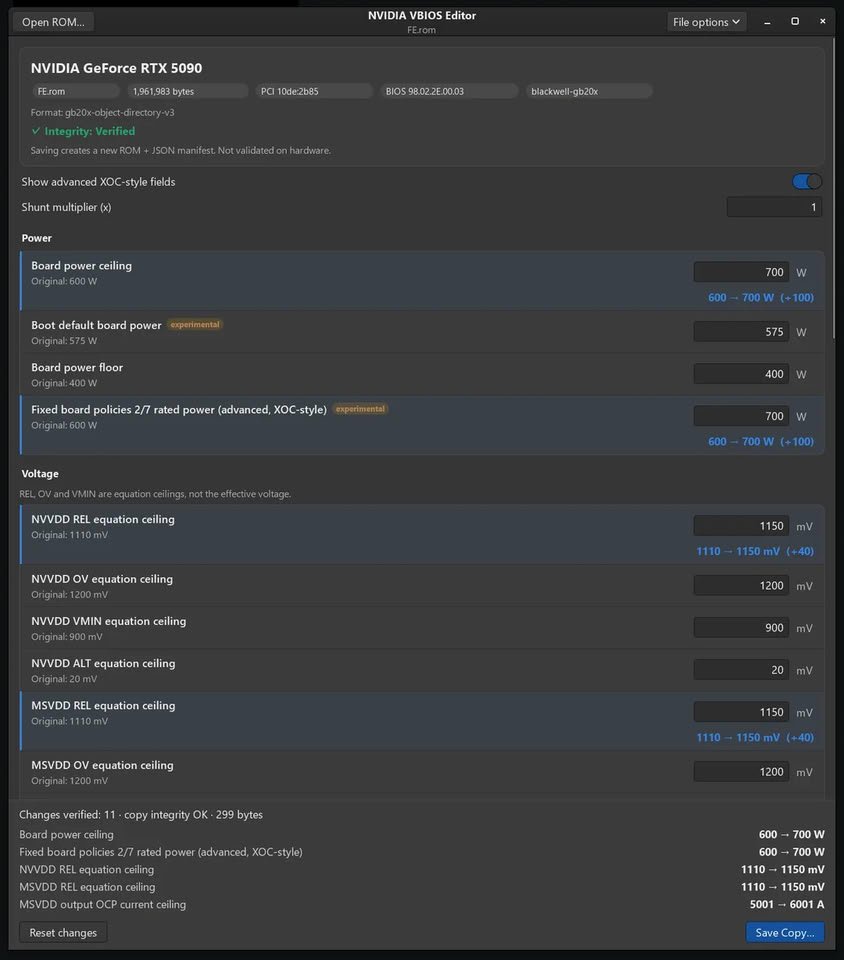
The toolset comprises three distinct components: a VBIOS editor and two separate loaders for Windows and Linux. The VBIOS editor serves as the command center, allowing users to alter critical hardware parameters such as power delivery limits, voltage ceilings, overcurrent protection (OCP) thresholds, fan control channels, and clock offset ranges.
Crucially, the editor maintains the original NVIDIA digital signature on the modified image. Because the signature remains intact but the underlying data has been altered, traditional flashing utilities like nvflash reject the image. This is where the loaders provide a workaround. On Windows, the loader operates by injecting the custom VBIOS image into the NVIDIA driver’s registry keys. During the system startup sequence, the driver detects the override and loads the modified configuration as if it were the authentic firmware. On Linux, the approach involves patching the open-source NVIDIA kernel modules to ensure the GPU System Processor (GSP) firmware initializes using the user-provided, modified image.
Performance Gains and Power Ceiling Expansion
The potential impact on hardware performance is significant. Testing conducted by the developer has demonstrated substantial headroom increases across multiple generations of NVIDIA silicon. For instance, an RTX 5090 Founders Edition, which typically operates under a 600W power ceiling, saw its limit pushed to 700W, with some iterations reaching as high as 800W. Similarly, the RTX 4090 benefited from a power limit increase to 750W, alongside a doubled core clock offset range of +2,000 MHz.
These modifications are not merely superficial. By raising the NVVDD and MSVDD voltage ceilings—from the stock 1,110 mV to 1,150 mV in recent tests—enthusiasts can stabilize higher clock frequencies that would otherwise result in instability or crashes due to insufficient voltage. While the tools currently support RTX 30, 40, and 50-series cards, they do not yet extend to laptop GPUs, and users should note that memory timings remain hard-coded and read directly from the physical flash chip, meaning they cannot be modified through these software overrides.
System Compatibility and Driver Interaction
The Windows implementation of this loader is particularly interesting given recent industry developments. The loader requires driver version 616.56 or newer to function. This timing is noteworthy because NVIDIA recently took active steps to neutralize third-party power limit control tools, such as the mVolt+ utility, via driver updates.
The developer’s loader utilizes the same registry manipulation techniques that were previously employed by such utilities, suggesting that the underlying hooks remain accessible despite NVIDIA’s attempts to restrict them. While there is no official confirmation regarding how NVIDIA will respond to this new software, the nature of the driver-level override implies that future updates could potentially deprecate this capability. Furthermore, while the Windows loader is open-source, the VBIOS editor is currently provided as closed-source binaries, a distinction that may influence community adoption and future development efforts.
Risks and Recommendations for Enthusiasts
Despite the safety net provided by non-destructive loading, modifying the VBIOS remains an advanced operation with inherent risks. Pushing power and voltage limits beyond factory specifications can accelerate hardware degradation, known as electromigration, and places significant thermal strain on the Voltage Regulator Modules (VRMs). Users who intend to push their hardware into these extreme performance tiers must ensure their cooling solutions are more than adequate to handle the thermal load.
Because these tools interact with low-level driver initialization, it is imperative that users maintain a backup of their original, unedited VBIOS ROM before attempting any modifications. Furthermore, the developer strongly advises testing these configurations on a secondary graphics card rather than the primary device used for daily display output. By isolating the experimental hardware, users can protect themselves from potential system hangs or boot failures while fine-tuning their performance profiles. This toolkit represents a powerful, albeit experimental, advancement for the PC enthusiast community, granting users unprecedented control over the hardware they own.
Disclaimer: This content is auto-generated for informational purposes only.
Source: Read Original News