







Expanding the Palette: New Visual Customization
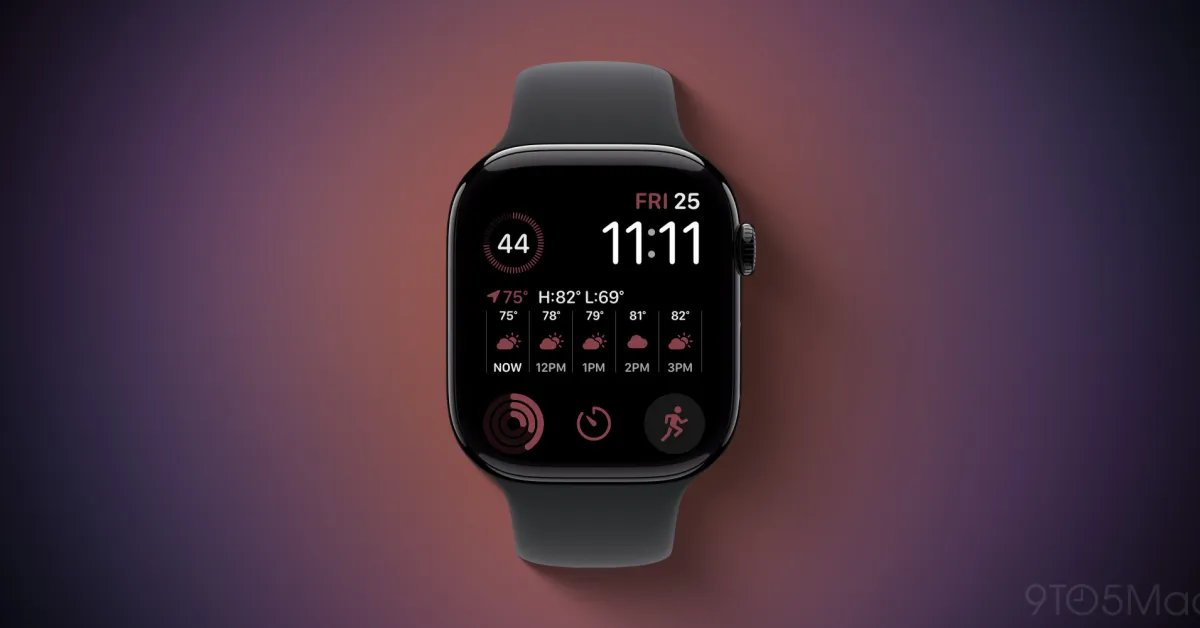
The Apple Watch has long been defined by its ability to balance utility with personal style. Among the various digital faces available, the Modular design remains the gold standard for users who prioritize information density and efficiency. With the rollout of watchOS 27, Apple has deepened the customization capabilities of this classic interface by introducing 13 distinct color additions. This update provides users with a broader spectrum of hues to match their bands, clothing, or environment, further cementing the watch as a staple of functional fashion.
The new additions include a diverse range of tones such as Olive, Burgundy, Sand, Magenta, and Pale Succulent. Other notable entries include Wildflower Blue, Navy Blue, Light Umber, Chambray Blue, Limestone, Camel, Sage, and Mulberry. By integrating these specific, nuanced colors, Apple allows for a more refined aesthetic, moving away from standard primary colors toward a more sophisticated palette. Users can access these choices directly through the face customization menu. For those who prefer the legacy color sets, the interface retains a “Tap to add more colors” feature at the bottom of the selection screen, ensuring that the transition to the new update does not remove previously favored aesthetic settings.
Advanced Health Metrics via Modular Complications
Beyond the surface-level aesthetic upgrades, watchOS 27 delivers significant functional improvements to the Modular face through new, high-density complications. Complications are the small, interactive widgets that populate the modular slots, providing real-time data without the need to launch individual applications. In this latest iteration, Apple has optimized the delivery of health and fitness data, which remains a core pillar of the device’s identity.
Exclusive to the latest hardware, specifically the Apple Watch Ultra 4 and Series 12, users can now integrate specialized complications for Daily Steps, Heart Rate, and Readiness metrics. These tools allow for a granular view of physical activity and recovery status directly on the watch face. For instance, the Readiness complication offers a quick synthesis of physiological data, providing a snapshot that helps users decide whether to push their training intensity or prioritize recovery. By surfacing this data, the update reduces the number of taps required to manage health habits, keeping critical performance indicators visible at a glance.
The Architecture of the Modular Face
The Modular face serves as a blueprint for information architecture on small-form-factor devices. Its design relies on a grid-like layout that allows users to place multiple complications in strategic positions, such as the large central rectangular slot, which is perfect for complex data like calendar agendas or weather forecasts, alongside smaller circular slots for secondary information. The inclusion of new color schemes and data-rich complications confirms Apple’s commitment to iterating on this specific design rather than simply replacing it.
The longevity of the Modular design is a testament to its efficiency. By maintaining the base structure while updating the visual properties and the underlying data pipelines, Apple ensures that existing users experience a sense of familiarity while benefiting from improved technical utility. This approach minimizes the learning curve while providing a genuine incentive to upgrade to newer hardware, such as the Series 12 or the Ultra 4, which are architecturally better suited to process and display these more complex and frequent data updates.
Impact on User Workflow and Productivity
The integration of advanced complications into a customizable environment like the Modular face has a measurable impact on user workflow. By curating the information displayed, a user can transform their watch from a simple notification delivery system into a dashboard tailored to specific professional or athletic needs. A professional might use the large central complication for upcoming meetings while pinning the weather and calendar to smaller slots. Conversely, an athlete can prioritize heart rate variability and step count, creating a dedicated training monitor.
This level of personalization minimizes cognitive load. Instead of navigating through menus to find health trends or schedule updates, the user interacts with a static but dynamic display. The addition of the 13 new color schemes further serves a functional purpose; color-coding can be used to distinguish between different modes of operation. For example, a user could set a “Work” face with a neutral tone like Limestone or Navy Blue, and a “Fitness” face using a vibrant Magenta or Wildflower Blue. This visual differentiation allows for an immediate understanding of the watch’s current configuration.
Hardware Synergy and Future Integration
The synergy between watchOS 27 and the latest hardware, particularly the Series 12 and Ultra 4, highlights a trend toward tighter integration between software capabilities and sensor performance. The new health complications require consistent and accurate background processing, which is facilitated by the improved power management and processor efficiency of the newest models. By limiting these specific, high-resolution complications to the latest devices, Apple creates a clear performance ceiling that ensures the device remains responsive and battery-efficient.
As the ecosystem matures, the role of the watch face continues to evolve from a static display to a highly intelligent, context-aware interface. While the Modular face currently serves as the premier choice for power users, the addition of these colors and data points demonstrates that even the most mature design languages can be refreshed. This strategy not only maintains user engagement with the Apple Watch platform but also highlights how small, iterative software updates can extend the utility of the hardware in a meaningful way. As watchOS continues to develop, it is likely that the Modular interface will remain the foundation upon which future, even more complex complications are built.
Disclaimer: This content is auto-generated for informational purposes only.
Source: Read Original News