







The Evolving Landscape of Portable Computing: Googlebook vs. MacBook Air
The personal computing market has recently seen the introduction of the “Googlebook,” a new hardware entry designed to bridge the gap between mobile Android ecosystems and traditional laptop productivity. As users begin to integrate these devices into their daily routines, comparisons with established industry leaders like the Apple MacBook Air are inevitable. While the Googlebook offers innovative features, current evaluations suggest it occupies a different space than the highly refined, mature ecosystem of Apple’s M-series hardware.
For many professionals, the choice of a primary machine is dictated by the intersection of reliability, software capability, and hardware finesse. While the Googlebook represents a bold shift in how operating systems might function on portable hardware, the MacBook Air remains the standard for users who require a seamless transition between complex professional workflows and travel-based productivity.
Hardware Ergonomics and Design Choices
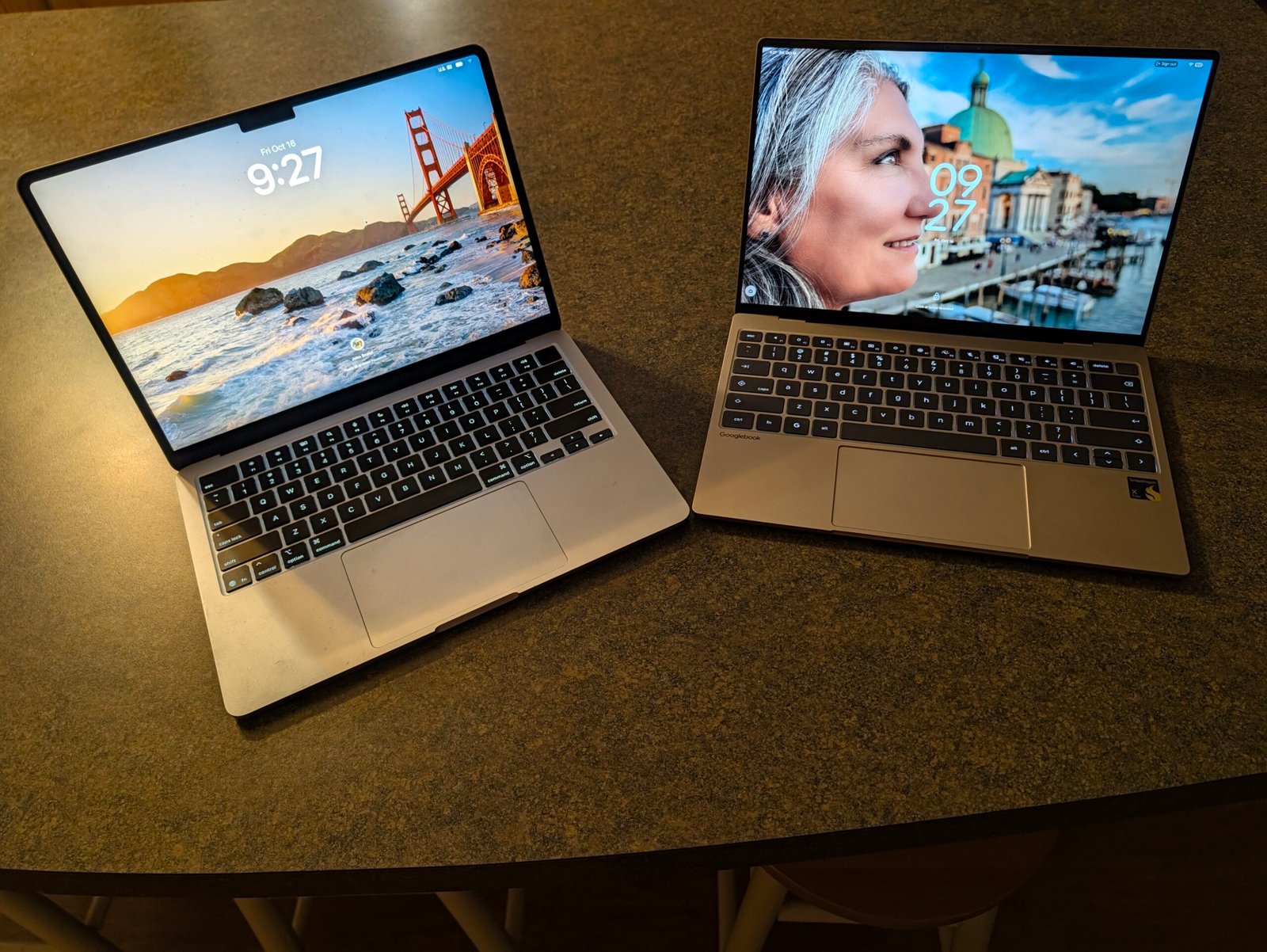
In terms of physical design, the Googlebook, particularly in its Dell XPS-based configuration, presents a compelling aesthetic. The device features a smaller footprint than the 14-inch MacBook Air, making it an attractive proposition for frequent travelers who prioritize portability in cramped environments like airplane cabins. Furthermore, the keyboard feedback on the XPS variant offers a tactile, punchy response that some users may find superior to the lower-travel, softer keys found on the MacBook Air.
Connectivity is another area where manufacturers diverge. The Googlebook provides a functional advantage by placing USB-C ports on both sides of the chassis, offering greater flexibility for peripheral management. However, the MacBook Air maintains a slight edge in legacy hardware support by retaining a dedicated headphone jack—a feature notably absent on the current XPS iteration of the Googlebook. While both devices are restricted to two USB-C ports, the trade-off between side-mounted utility and dedicated audio connectivity represents a choice between different user priorities.
The Promise and Performance of Advanced Features
One of the most significant technological advantages of the Googlebook is its integration of the “Rambler” voice-to-text functionality. Borrowed from advanced Android mobile architectures, this feature provides remarkably accurate transcription capabilities. For content creators, journalists, or anyone needing to digitize spoken thoughts, this tool stands as a highlight of the device’s capabilities. It operates with a level of efficiency that suggests a future where voice-based input may play a much larger role in desktop productivity.
Beyond software, the display technology in the Googlebook also demonstrates ambition. It features a 120 Hz screen refresh rate, a significant leap over the 60 Hz standard typically found in the MacBook Air. While this high-refresh panel offers smoother scrolling and visual transitions, its practical impact on day-to-day document editing or web browsing is minimal. For professional productivity, the crispness and color accuracy—which both devices deliver at high levels—often outweigh the utility of high-refresh-rate panels, which are more frequently associated with gaming or high-fidelity media production.
Software Constraints and Ecosystem Limitations
The primary hurdle for the Googlebook, at least in its current developmental phase, is its reliance on Android-based software applications. While these applications are optimized for touch and mobile use, they often lack the comprehensive feature sets found in their full desktop counterparts. For tasks such as advanced photo editing in Adobe Photoshop or complex document formatting in Microsoft Word, the Android versions provide a functional experience that is sufficient for light use but insufficient for deep, professional-grade output.
This disparity in software maturity highlights the fundamental difference between the two platforms. The MacBook Air benefits from decades of OS refinement and a massive library of native, fully-featured desktop software. Conversely, the Googlebook is an early-stage product. While it succeeds in casual environments, those who rely on high-performance desktop suites for critical work will find themselves limited by the current architectural constraints of the Android-based software environment.
Hardware Stability and User Experience
A critical area where the Googlebook faces challenges is hardware stability, specifically regarding audio management. Reports have indicated persistent issues with volume normalization, where playback levels fluctuate without user input. This, combined with chassis vibration and audio distortion at higher volumes, detracts significantly from the premium nature of the device. Such technical inconsistencies suggest that while the hardware design is sleek, the internal implementation requires further optimization.
Conversely, the MacBook Air maintains its reputation for high-quality audio output and reliable mechanical performance. The disparity in speakers alone highlights the “first-generation” nature of the Googlebook. When a user is forced to rely on external Bluetooth speakers to mitigate internal hardware flaws, the portability value proposition of a laptop is compromised. Until these bugs are addressed through firmware updates—which are expected in the coming months—the reliability of the MacBook Air remains a primary factor in purchasing decisions for power users.
Future Outlook for the Platform
The Googlebook is currently in its nascent stages, supported by a commitment from Google for a decade of updates. This longevity strategy suggests that the platform is intended to evolve into a more capable, stable environment. Much like the early days of any new operating system, the initial version acts as a baseline from which refinement, app ecosystem expansion, and bug remediation will occur.
For the present, the choice is clear for those who prioritize immediate, consistent performance: the MacBook Air remains the superior tool for professional workflows. However, for those interested in the future of mobile-desktop integration, the Googlebook offers a glimpse into a potential shift in computing habits. As the software matures and hardware quirks are resolved, the gap between the two platforms may narrow, but for now, the Googlebook remains a specialized device for early adopters rather than a comprehensive replacement for mature, full-featured workstations.
Disclaimer: This content is auto-generated for informational purposes only.
Source: Read Original News