







A Unified Visual Identity Across Platforms
The landscape of web browsing is undergoing a significant shift as Mozilla rolls out a comprehensive design overhaul for Firefox. This update marks a pivotal moment in the browser’s history, moving toward a cohesive visual language that spans both desktop and mobile environments. By aligning the aesthetics of Firefox across all devices, Mozilla is ensuring that the user experience remains consistent, whether an individual is navigating the web on a high-resolution desktop monitor or a mobile device during a commute.
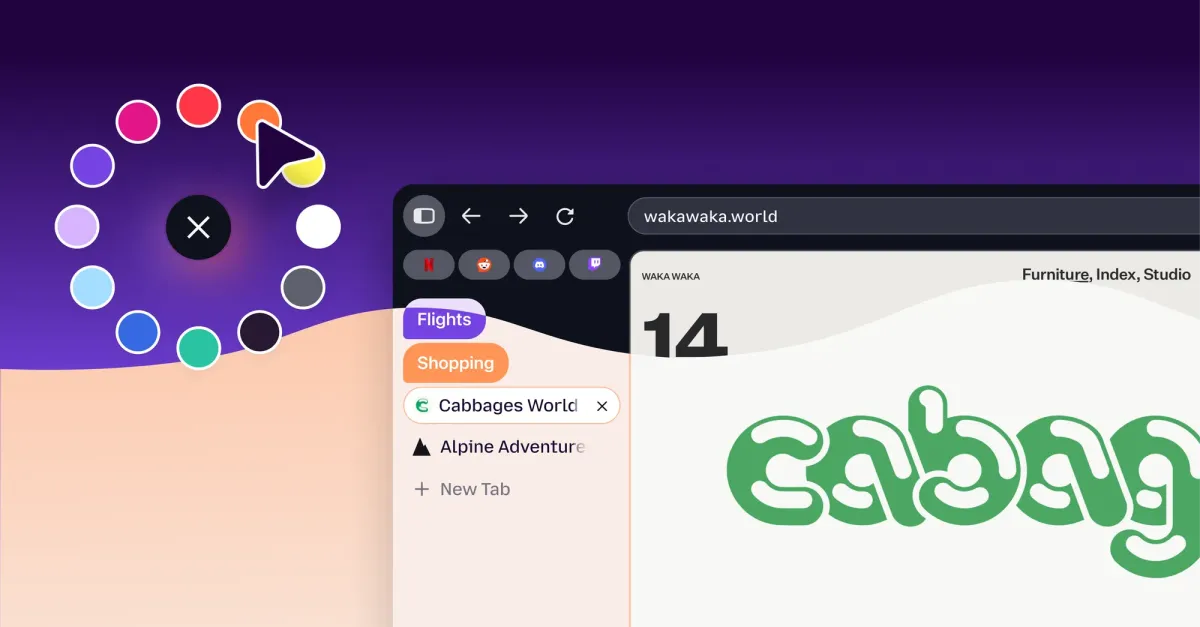
The most immediate change users will notice upon launching the updated browser is the implementation of a softer, more rounded aesthetic. The transition introduces bubble-like tabs and a rounded address bar, departing from the sharper, more angular lines that previously defined the browser’s interface. This move toward fluid geometry is not merely aesthetic; it is intended to create a less cluttered, more approachable workspace. Mozilla has confirmed that these architectural changes to the interface have been optimized to ensure there is no performance penalty, maintaining the browser’s reputation for speed and resource management.
Prioritizing Screen Real Estate with Compact Mode
While the new, rounded design focuses on modern aesthetics, Mozilla has simultaneously acknowledged the needs of power users who prioritize functionality over decorative elements. In direct response to feedback from its community, the latest iteration of Firefox brings back the much-requested Compact Mode. This feature is specifically engineered for users who operate on smaller screens or who manage dozens of open tabs simultaneously.
Compact Mode serves to tighten the layout of the toolbar and tab strip, reducing the vertical footprint of the browser interface. By condensing these elements, the browser allocates more physical screen space to the primary purpose of any web browser: displaying content. For those working in professional environments, such as researchers, developers, or content creators who frequently switch between multiple web pages, this return to a compact configuration significantly enhances the utility of the browser by minimizing interface distractions. The inclusion of an auto-compact setting further allows the browser to dynamically adjust its layout based on screen resolution, providing a seamless transition between different hardware configurations.
A Strategic Response to a Competitive Market
The visual evolution of Firefox places it in closer alignment with industry rivals, most notably Google Chrome. By adopting rounded UI elements and a simplified, airy design, Firefox is clearly pivoting toward a modern design standard that users have come to expect from primary productivity applications. While critics might point to the visual similarity as a convergence toward a singular industry standard, Mozilla maintains that this update is a necessary renewal.
This design shift acts as a foundation for broader technical integration. In the past year, Mozilla has introduced a suite of features including homepage widgets, Split View, and a built-in VPN, all of which require a stable and modular interface to remain usable. By standardizing the visual language, Mozilla ensures that these diverse tools—ranging from productivity aids to privacy-focused utilities—feel like integrated parts of a single ecosystem rather than disparate additions. The redesign signals that Firefox is positioning itself not just as a privacy-focused alternative, but as a modern, feature-rich productivity suite capable of competing directly with the most popular browsers on the market.
Navigating the Integration of Artificial Intelligence
The redesign of Firefox arrives during a period of rapid development in browser-based artificial intelligence. While the browser has made headlines for offering granular control over AI features—allowing users to disable automated functions if they prefer a manual experience—Mozilla is not shying away from innovation. Earlier this year, the company launched its Smart Window AI mode, a strategic move to address the growing demand for intelligent browser assistants.
The Smart Window AI mode provides users with contextual insights, automated task management, and information synthesis directly within the browser tab. This feature is a direct competitor to the AI-driven capabilities currently appearing in browsers like Chrome. The challenge for Mozilla lies in balancing these high-compute AI functions with its long-standing commitment to user privacy and performance. By building these AI tools within the context of a modernized, streamlined UI, Mozilla is attempting to prove that the integration of advanced machine learning does not have to result in a “bloated” software experience. The aesthetic update, therefore, serves a dual purpose: it refreshes the look of the browser while providing a clean canvas for the next generation of AI-assisted browsing.
Customization and User Autonomy
Central to the philosophy of Firefox is the concept of user agency, and this design update reinforces that through expanded customization. Alongside the structural changes, Mozilla has introduced an array of new color palettes, themes, and wallpaper configurations. Users can now tailor the appearance of their browser to suit their specific workflows or visual preferences, with each theme optimized for both light and dark modes.
This focus on personalization ensures that while the base architecture of the browser becomes more standardized, the individual experience remains unique. By offering a wide selection of themes, Mozilla is catering to a diverse user base that values both the technical efficiency of the browser and the ability to dictate the visual environment in which they work. This combination of structural reliability and surface-level flexibility highlights the core mission of the update: to modernize the browser’s interface to meet contemporary standards, while simultaneously preserving the distinct level of control that has been a hallmark of the platform for decades.
Disclaimer: This content is auto-generated for informational purposes only.
Source: Read Original News