






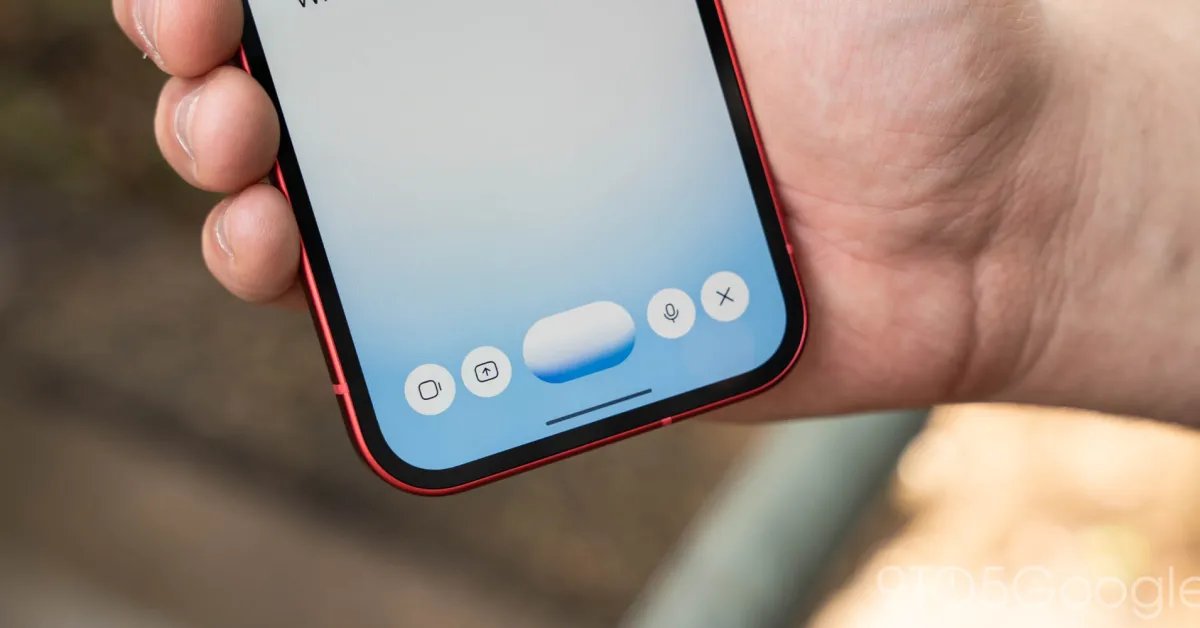
Google has initiated a significant update to its Gemini Live interface on Android, introducing a refined input mechanism designed to simplify how users interact with multi-modal content during active sessions. This latest change, currently surfacing in version 17.68 of the Google app, focuses on creating a more fluid experience for incorporating external assets like images, documents, and screen-sharing data into real-time conversations.
The New Plus Menu Architecture
The most prominent feature of this update is the addition of a plus button, strategically placed on the left side of the interface within the Gemini Live overlay. This button acts as a gateway to a new, consolidated carousel menu. When tapped, this menu provides direct access to four primary input types: screen sharing, photo selection, file uploading, and direct integration with Google Drive.
Previously, users were required to pre-load documents or images into the Gemini interface before launching a live session. This established a barrier for dynamic workflows where a user might decide mid-conversation that they need to reference a specific file or visually demonstrate an issue on their device. By moving these functions directly into the Live session window, Google has shifted the interaction model toward a more responsive, integrated experience.
Enhanced Workflow and Navigation
With the introduction of this menu, the user interface layout has undergone subtle but meaningful adjustments. The camera button, which was previously a primary fixture of the interface, has been relocated to sit adjacent to the central waveform display. This change allows users to continue engaging with the live AI model while simultaneously reaching for contextual tools.
While the primary controls for the microphone mute switch and the session termination button remain in their original positions on the right, the overall arrangement suggests a more organized hierarchy of features. This design strategy aims to reduce cognitive load by grouping content-sharing tools separately from session management tools. Users can now maintain the flow of a conversation without having to exit the session or navigate through complex menus to pull in relevant information.
Use-Cases for Dynamic Input
The ability to introduce external files and screen data during a live voice interaction opens several practical use-cases for professionals and casual users alike. For instance, a user discussing a complex technical issue can now instantly trigger a screen share to show the AI the exact state of an application, providing the model with visual context that text-based prompts often miss.
Furthermore, the integration with Google Drive allows for seamless collaboration on documents. If a user is working through a project plan or a draft document, they can pull the file directly from their cloud storage into the session. Gemini can then parse the document in real time, offering suggestions, summarizing content, or answering specific questions based on the uploaded material while the voice session continues. This capability effectively turns the AI into a real-time partner that can observe, read, and analyze data on demand.
Limitations and Deployment Status
While the update represents a significant step forward in interface design, it is important to note current limitations. The new plus menu is presently restricted to the dedicated Gemini Live interface. If a user launches the AI via the standard overlay—where the interface may prioritize different controls—the new menu is not yet available. This suggests that Google is still in the process of rolling out these UI elements across different entry points within the ecosystem.
Additionally, this feature is strictly limited to the Android platform at this time. Apple users operating Gemini via the iOS app do not yet have access to this carousel-style input menu, as Google continues to prioritize its Android feature roadmap. Users seeking to utilize this feature should ensure their Google app is updated to version 17.68 or later to confirm the presence of the redesigned controls.
Future Implications for AI Interaction
This update illustrates a broader trend in the development of AI assistants: the move from passive, command-based interfaces toward active, multi-modal collaboration tools. By reducing the friction involved in sharing screen data and local files, Google is making its AI more capable of participating in real-world tasks that require immediate visual or document-based context.
As interfaces continue to evolve, the goal remains to minimize the distance between the user’s intent and the AI’s capability. By integrating these tools directly into the live conversation, Google is attempting to make Gemini feel less like a distinct application and more like a pervasive assistant that understands the user’s digital environment. Future updates will likely continue to expand this integration, perhaps incorporating more seamless transitions between voice, text, and visual input methods, further bridging the gap between human interaction and machine intelligence.
Disclaimer: This content is auto-generated for informational purposes only.
Source: Read Original News