






Upon successfully updating their Pixel phone to the Android 17 QPR2 Beta 3, users will discover an intuitive method for activating this security layer. A simple long-press on any desired application icon will reveal a contextual menu, from which the new “App Lock” option can be selected. This seamless integration ensures that securing applications is not only possible but also remarkably straightforward for the average user.
The utility of being able to lock individual applications on an Android device cannot be overstated. In scenarios where an unlocked phone might fall into the wrong hands, the absence of per-app security poses a considerable risk. An unauthorized individual could potentially gain unfettered access to sensitive data across various applications, including banking apps, messaging services, and personal photo galleries. By implementing an App Lock, users are afforded an additional, robust layer of defense, effectively preventing access to specific applications even if the device’s main lock screen has been bypassed. This proactive security measure is pivotal in maintaining the integrity of personal information.
When an App Lock is activated for a particular application, opening it will necessitate a secondary authentication step. This can typically be accomplished through biometric methods such as a fingerprint scan or face unlock, or by entering a pre-set pattern. This multi-factor authentication for individual applications significantly bolsters overall device security, providing peace of mind to users concerned about unauthorized access to their private data.
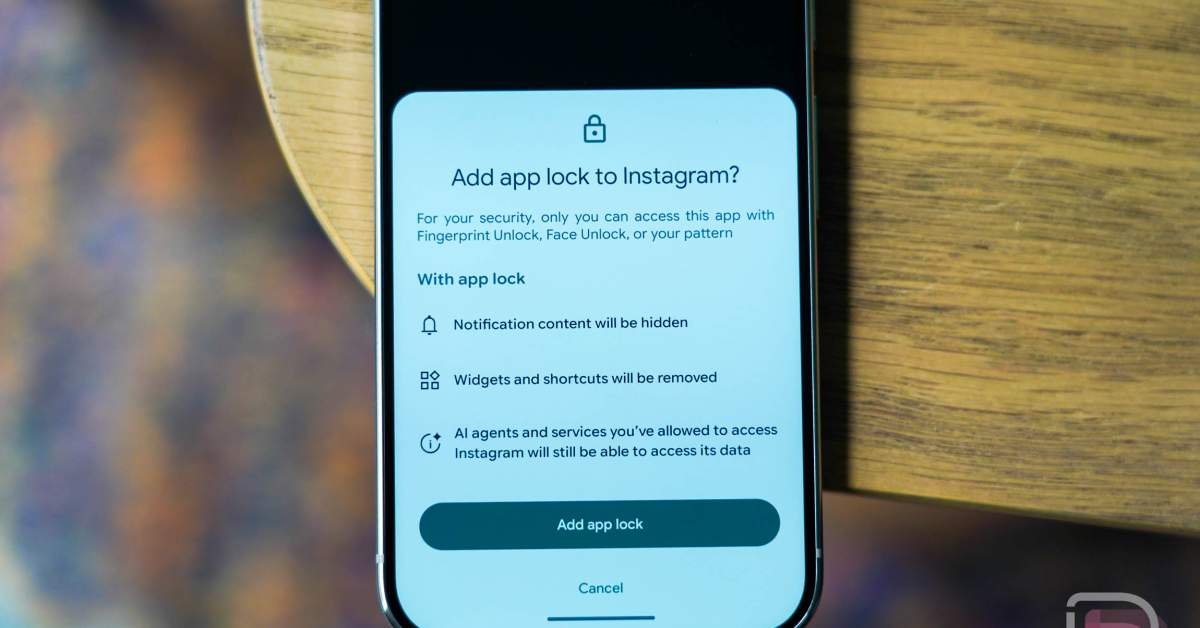
As depicted in accompanying visual aids, Google has meticulously designed the App Lock feature to extend beyond mere access restriction. Enabling an App Lock on an application will intelligently conceal the content of its notifications, preventing sensitive information from being displayed on the lock screen or in notification shades. Furthermore, any associated widgets or shortcuts for the locked application will be automatically removed, minimizing potential entry points for unauthorized access. However, in a move that underscores Google’s deep integration with artificial intelligence, it’s important to note that AI agents and services previously granted access to a locked application will retain that access. This detail highlights the complex interplay between security protocols and the evolving landscape of AI-driven functionalities within the Android ecosystem.
For those who prefer a centralized management approach, comprehensive controls for the App Lock feature are conveniently located within the device settings. Navigating to this dedicated section allows users to view a comprehensive list of all installed applications and, with simple toggles, activate or deactivate the app lock for each individually. This intuitive interface empowers users with granular control over their application security, allowing them to customize their protection based on their specific needs and concerns. This new security feature is a significant improvement in tech security for Android users.