









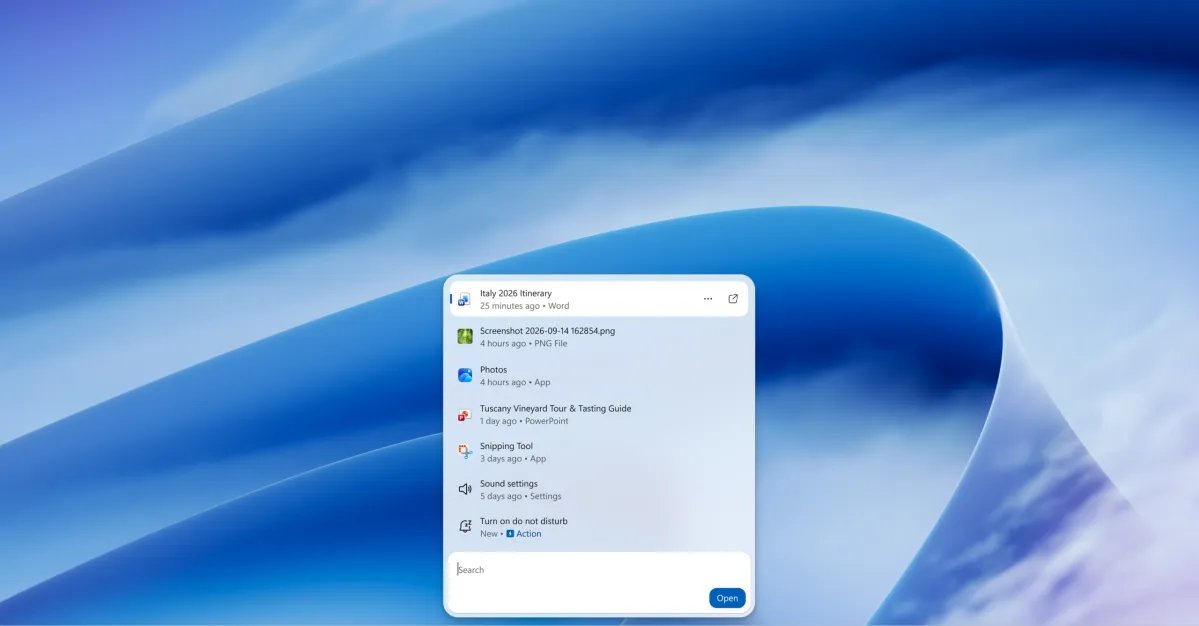
Modernizing the Core Windows Experience
For years, users have pointed to the Windows Search function as a primary source of friction within the operating system. Despite several iterations throughout the lifespan of Windows 10 and Windows 11, the search feature often felt sluggish, heavy on system resources, and disjointed from the rest of the desktop environment. Microsoft is now taking definitive steps to resolve these long-standing complaints by testing a ground-up redesign of the search interface, moving away from legacy frameworks to a more efficient, modern architecture.
The new search experience is fundamentally built upon WinUI 3, Microsoft’s latest user interface platform. By shifting to this framework, the company aims to ensure that search is not only visually consistent with the rest of Windows 11 but also significantly more responsive. Anshul Rawat, corporate vice president of the Windows product team, has characterized this update as a major investment in modernizing the core components of the platform. By prioritizing performance and memory management, Microsoft is attempting to deliver a faster experience without increasing the system footprint, a common concern when updating built-in OS tools.
Architectural Efficiency and Performance Gains
One of the most critical aspects of this update is the focus on performance optimization. Historically, Windows Search has been criticized for high CPU and RAM consumption, often indexing files in a manner that impacted system responsiveness. Early testing data indicates that the transition to the new WinUI 3-based architecture has resulted in substantial improvements in memory efficiency.
Beyond raw speed, the overhaul introduces a refined UI that prioritizes fluid, high-frame-rate animations and a more spacious layout. The addition of a large, dedicated preview pane allows users to inspect content—such as documents, photos, or media—without needing to open the parent application. This reduces the time spent navigating the file system, enabling users to verify information directly within the search results window. By minimizing the latency between the query and the display of results, the system creates a more cohesive workflow.
Enhanced Intelligence and Query Processing
A search tool is only as effective as its ability to interpret user intent. Microsoft is upgrading the logic behind the search engine to provide more accurate matching for typographical errors and synonyms. In previous versions, even minor misspellings could often lead to zero-result pages or irrelevant suggestions, forcing users to manually locate files.
The updated search engine moves away from relying solely on exact keyword matches. By incorporating better linguistic processing, it can interpret the semantic meaning of a query. For instance, when a user searches for a specific file type or a descriptive term, the engine is significantly more capable of surfacing the intended document or setting. This intelligent matching is designed to save time and reduce the frustration of needing to know the exact filename to locate content stored deep within the drive.
Search as a Command Launcher
Perhaps the most transformative change is the evolution of Windows Search from a simple file-finder into a powerful system launcher. Drawing inspiration from advanced third-party productivity tools, the new search interface allows users to execute system-level commands directly. Instead of navigating through multiple layers of the Settings application, a user can simply type a command to toggle Bluetooth, switch to dark mode, or adjust system preferences.
This functionality extends beyond simple toggles to include window management and complex application interactions. Users can command the system to arrange windows side-by-side or minimize active tasks, turning the search bar into a central control hub. Furthermore, integration with the Phone Link feature brings this capability to mobile devices connected to the PC. A user can perform actions such as sending a text message or checking notifications on a synced smartphone directly from the desktop search bar, streamlining communication and management tasks into a single entry point.
Future Roadmap and Integration
While the interface is currently available for testing among Windows Insiders, its arrival in the general Windows 11 ecosystem is expected in the coming months. The rollout is being approached as a multi-stage project. The current testing phase focuses on the standalone search experience, but the roadmap for the following year is already clear. Microsoft intends to integrate this new engine directly into the Start menu, allowing for a unified interface that adapts to various taskbar positions and screen configurations.
The ultimate goal, as articulated by the Windows product team, is to make search a proactive element of the operating system. By fostering more natural language input and providing richer, context-aware information, Microsoft hopes to bridge the gap between searching for data and actually performing work. As this feature moves toward a public release, it represents a shift in how Windows manages the relationship between user intent, system data, and application control, signaling a more streamlined future for the platform’s overall utility.
Disclaimer: This content is auto-generated for informational purposes only.
Source: Read Original News