








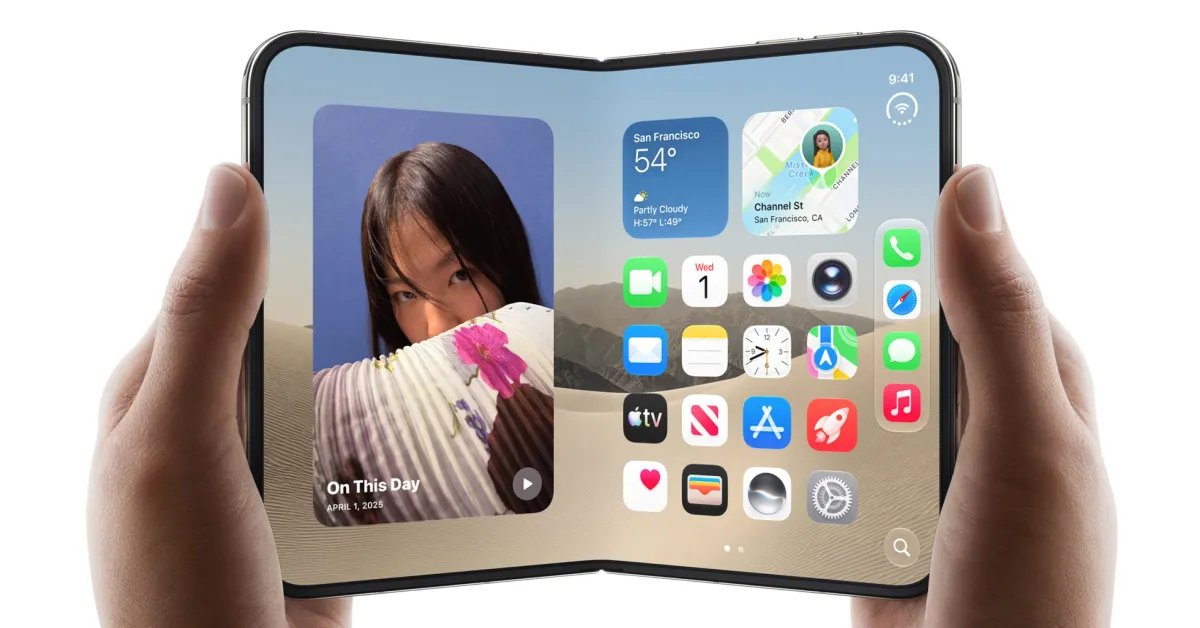
The Evolution of Mobile Productivity with iPhone Duo
The unveiling of the iPhone Duo has signaled a shift in how Apple approaches the intersection of mobile portability and tablet-grade productivity. While the standard iPhone form factor has remained relatively static for over a decade, the introduction of the dual-screen folding mechanism addresses a long-standing critique regarding screen real estate. As the October launch date approaches, technical details regarding the interface and software architecture are beginning to emerge, shedding light on how the device will manage complex digital documents and professional workflows.
The core advantage of the iPhone Duo lies in its ability to transition from a pocketable handset to a unified, expansive display. This transition is not merely a change in physical size but a shift in the operating system’s responsive design. By leveraging a larger surface area, the device allows for a more granular level of interaction with dense media, specifically Portable Document Format (PDF) files, which have traditionally been difficult to navigate on smaller smartphone screens.
Optimized PDF Navigation and Multi-Page Layouts
Recent leaks detailing the software implementation for PDF management reveal a sophisticated approach to utilizing the dual-panel display. A notable feature currently under observation is the enhanced Quick Look capability. In this mode, the iPhone Duo abandons the cramped single-column scroll used on standard handsets in favor of a dual-page spread. This layout mimics the physical experience of reading a book or a technical manual, providing context that is often lost when navigating pages sequentially on a smaller device.
The software architecture appears to intelligently scale content based on the hinge status. When the device is held in an open, flat orientation, the OS initiates a landscape-spanning view that displays two consecutive pages side-by-side. This is achieved through a dynamic rendering engine that ensures text remains sharp while maintaining consistent margins. For users who frequently analyze white papers, academic research, or multi-page contracts, this change represents a significant increase in functional throughput. The ability to scan two pages simultaneously reduces the need for constant scrolling, which inherently improves document navigation speed and retention.
Integration with Stylus Technology and Annotation
Beyond simple consumption, the iPhone Duo is positioned to serve as a high-precision tool for document annotation. While initial reports focus on the viewing experience, the hardware architecture is built to accommodate future input paradigms, including upcoming compatibility with a specialized version of the Apple Pencil. The implementation of stylus support on a folding display introduces unique technical challenges, particularly regarding pressure sensitivity and latency across the hinge.
By integrating active pen technology, the iPhone Duo transforms into a portable workspace. Users will be able to perform markup, sign documents, and highlight key segments with the precision typically reserved for the iPad Pro. This expansion in utility is critical, as it bridges the gap between a portable consumption device and a professional-grade creative tool. The hardware will likely utilize advanced haptic feedback to mimic the sensation of physical pen-on-paper interaction, further distinguishing the Duo from non-folding mobile devices.
Software Responsiveness and Dual-Display Logic
A critical component of the iPhone Duo’s success is its internal software logic that manages the transition between single-screen and dual-screen states. When a user unfolds the device, the operating system must instantly reformat active documents without interrupting the flow of the application. This requires a robust synchronization between the graphics processor and the display controllers to ensure that frames remain consistent across the central hinge.
The current implementation of the dual-page PDF mode relies on a seamless buffer transition. As the device opens, the application detects the change in aspect ratio and updates the internal layout configuration in real-time. This is supported by an updated kernel that prioritizes background tasks for document rendering, ensuring that large, image-heavy PDFs remain fluid during navigation. This level of software optimization is what separates the iPhone Duo from earlier, experimental folding designs that often suffered from layout jitter or sluggish scaling.
Impact on Professional and Educational Use Cases
The professional impact of this hardware development cannot be understated. For fields that rely on heavy documentation, such as law, medicine, and engineering, the ability to carry a device that comfortably displays technical diagrams and complex text is a significant improvement. On a standard smartphone, detailed schematics are often illegible without constant zooming and panning, which can break a user’s focus.
In an educational setting, the iPhone Duo serves as a bridge for students who require a lightweight device for reading coursework but lack the desire to carry a full-sized tablet. By providing a “portable library” experience, Apple is targeting a demographic that values minimalism without sacrificing the high-resolution readability required for long-form study. As the ecosystem of apps updates to support the Duo’s specific display geometry, the expectation is that developers will further leverage the dual-panel layout to include secondary toolbars, side-by-side reference windows, and intuitive multitasking environments, effectively replacing the need for secondary mobile hardware in many professional contexts.
As the market prepares for the official release, the focus will likely shift from the physical mechanics of the device to the depth of the app ecosystem. However, even at this early stage, the technical foundation for a superior document-viewing and editing experience is clear, positioning the iPhone Duo as a primary candidate for those seeking to maximize mobile productivity.
Disclaimer: This content is auto-generated for informational purposes only.
Source: Read Original News