







A New Approach to Mac Customization
The macOS interface has long been known for its polished, static aesthetic. While Apple provides a cohesive experience, users have historically had limited ability to modify the visual behavior of system icons. Designer Michael Flarup, a veteran in the field of interface design and author of extensive literature on app icons, has introduced a utility called IconSwapper that fundamentally changes how users interact with their dock. By allowing users to replace official application icons with custom, dynamic versions, the utility brings a level of personalization to the Mac that was previously restricted by system-level protections.
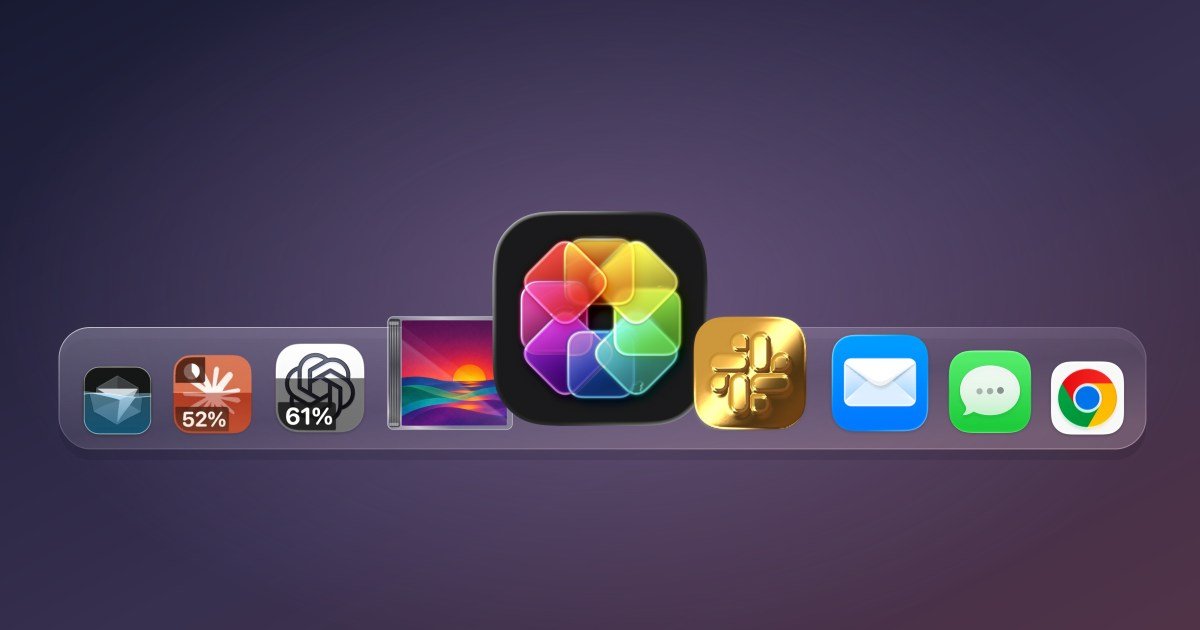
IconSwapper is not merely a cosmetic tool. It functions as a bridge between active system data and the visual representation of your applications. By leveraging custom Metal shaders, the application renders icon artwork in real time. This technical foundation allows for complex visual effects, such as simulated lighting that tracks the movement of a cursor or animations that indicate an application is performing a background task.
Transforming AI Usage Monitoring
One of the most practical applications for this tool is the ability to track artificial intelligence usage. As power users integrate AI platforms like ChatGPT, Claude, and Cursor into their daily professional workflows, staying within usage limits becomes a common concern. IconSwapper enables users to create “live” icons for these services that dynamically display usage data.
Instead of navigating to a browser dashboard or checking an account panel, a user can glance at their Dock to see a real-time status update on their AI quota. Because the icon responds to the status of the underlying application, it acts as a persistent, at-a-glance dashboard. This feature reduces the friction associated with managing tiered subscription models, providing a direct visual feedback loop that is both efficient and integrated into the standard macOS workflow.
Technical Innovation Through Metal Shaders
Achieving this level of interactivity on macOS is a non-trivial engineering task. Apple’s operating system is designed to protect system integrity, which includes strictly regulating how icons appear and behave within the Dock and the application switcher. Flarup’s approach circumvents these limitations without requiring system-level hacks or compromising security.
The breakthrough, as described by the developer, involved determining how to transmit a bitmap to the Dock that the operating system would accept as a valid frame for a running application. By running the artwork through custom Metal shaders, the application generates frames that respond to system events. This ensures that the custom icons remain consistent regardless of how the Dock scales or how the user navigates between applications using the Command-Tab switcher. The software maps the custom visuals to the native movements of the macOS interface, ensuring that the “live” elements feel integrated rather than superimposed.
Practical Utility Meets Visual Whimsy
While the AI monitoring feature offers a tangible productivity benefit, IconSwapper also caters to users who simply want to refine their desktop environment. The software supports a wide array of built-in customizations, allowing users to apply unique shaders, lighting effects, and animations to standard applications like Safari, Finder, and Spotify.
The capabilities extend to playful user interface enhancements. Users can configure the Finder icon’s character to track the movement of their cursor across the screen, or set Safari’s compass to pulse during page loads and file downloads. These animations do not add to the functional complexity of the applications but provide a layer of responsiveness that creates a more personal computing environment. For users with crowded docks, these visual queues serve as subtle indicators of activity, helping to distinguish between dormant and active processes through sight alone.
Accessing and Configuring the Tool
The installation process is designed for accessibility, ensuring that users do not need a background in software development to configure these dynamic icons. Upon launching the utility, users can select the target application and choose from a library of existing icon packs or upload their own custom designs. The interface utilizes simple toggles and buttons to apply complex shader effects, making the process of high-end icon customization manageable for a broad audience.
IconSwapper is currently positioned as a premium utility for the macOS ecosystem. It is available as a one-time purchase, with early adopters benefiting from a promotional price of $19 before it shifts to its standard pricing of $29. As the landscape of desktop software continues to favor static, uniform design, tools like IconSwapper provide a necessary outlet for users who demand both data-driven utility and a bespoke user experience. By merging the technical depth of Metal rendering with the aesthetic appreciation for classic icon design, the utility offers a unique way to bridge the gap between functional monitoring and creative desktop expression.
Disclaimer: This content is auto-generated for informational purposes only.
Source: Read Original News