








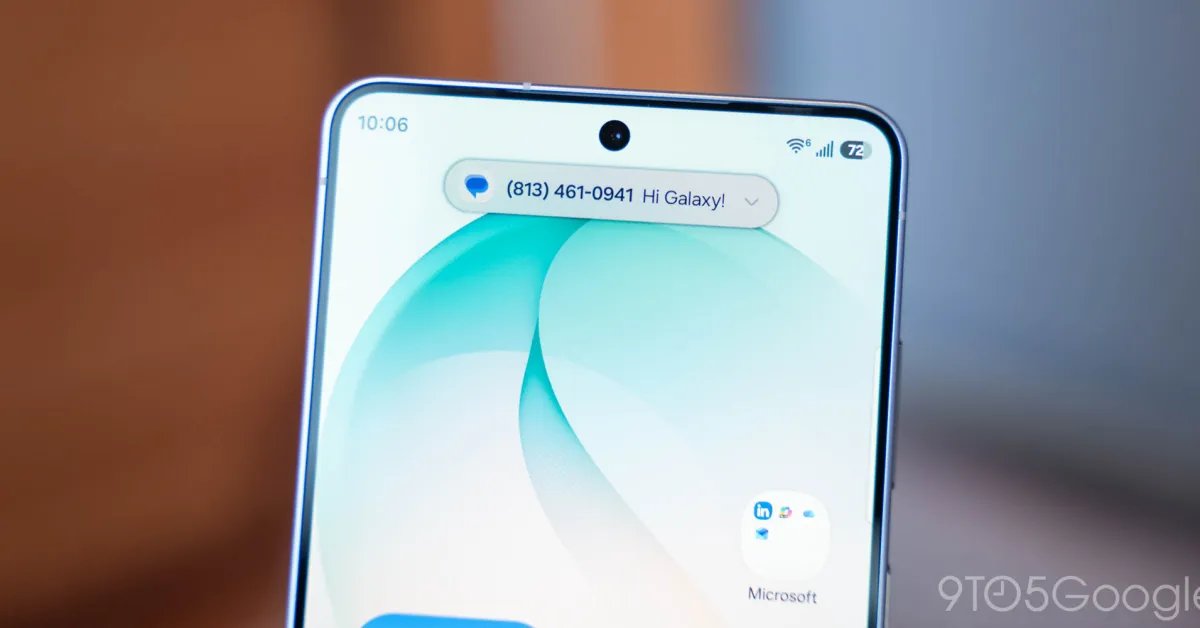
Samsung is reportedly developing its own iteration of the interactive notification interface popularized by Apple, marking a significant design shift for the Galaxy lineup. Recent leaks suggest that the South Korean manufacturer is working on a feature currently referred to as “Moment Effects.” This development signals an intention to move beyond the standard Android notification shade by utilizing the space surrounding the device’s front-facing camera cutout for real-time status updates and contextual alerts.
Understanding the Mechanics of Moment Effects
The concept of an interactive, camera-centered notification system is not new to the smartphone industry, but Samsung’s approach appears to focus on a higher level of integration than previous Android-based attempts. While many manufacturers have introduced basic notifications that simply blink or expand around the camera hole, these implementations often lack deep system-level support.
Moment Effects aims to function as a dynamic hub for ongoing activities. By leveraging Samsung’s existing Live Notifications framework, which is already compatible with a broad range of third-party applications, the interface can display real-time information such as sports scores, timer countdowns, and navigation status. The crucial technical differentiator here is the ability for users to interact with the interface—specifically the capacity to swipe between active processes. This interaction model mirrors the fluid experience seen in competing operating systems, allowing users to switch between a music player and a ride-sharing app without opening the full application.
The Evolution of Android UI Integration
For years, Android has relied on its robust, centralized notification shade and “Ongoing Notifications” to manage background tasks. While functional, these elements are static and tucked away at the top of the screen. By moving these indicators into a dedicated, visually active area around the punch-hole camera, Samsung is aiming to prioritize glanceable data.
The integration with services like Google Sports indicates that Samsung is building this system with broad developer compatibility in mind. By relying on established notification APIs, the manufacturer can bypass the common pitfall of limited third-party support that has hindered other Android-based clones. If executed correctly, Moment Effects will serve as a bridge between standard persistent notifications and a fully interactive, hardware-aware UI layer.
Expected Launch and One UI 9.5
Evidence regarding this feature has surfaced alongside the ongoing beta testing for One UI 9.5. This software version is expected to be the foundational update for the upcoming Galaxy S27 series, scheduled for release early next year. The presence of these UI elements within the beta software confirms that the feature is beyond the conceptual stage and is currently undergoing rigorous internal testing.
Integrating such a significant UI change into a major version update suggests that Samsung views Moment Effects as a core part of its future hardware-software synergy. For the Galaxy S27 series, this could serve as a primary selling point, offering users a more sophisticated way to handle multitasking on high-resolution displays. The shift also highlights Samsung’s willingness to adopt successful UX patterns from the broader mobile ecosystem while tailoring them to fit the specific constraints of the One UI environment.
Impact on User Experience and Multitasking
The primary benefit of a dynamic, screen-adjacent notification interface is the reduction of cognitive load. Rather than pulling down the entire notification shade to check on a background activity, the user receives a compact, visual representation of that task. This becomes increasingly useful as the number of background processes increases, such as monitoring a delivery, a live scoreboard, or an active voice recording session.
From a technical standpoint, the success of this feature hinges on latency and responsiveness. The animation must be perfectly synced with the frame rate of the display to ensure a premium feel. Furthermore, the handling of multi-activity scenarios—where a user might have two or three concurrent background tasks—will determine whether Moment Effects is viewed as a genuine productivity tool or merely a visual gimmick. Samsung’s implementation allows for quick switching between these tasks, suggesting that the company is prioritizing efficiency in high-density usage scenarios.
Technical Challenges and Design Considerations
Implementing an interface that physically wraps around a camera cutout presents several challenges, particularly regarding screen real estate and hardware design. The software must dynamically adjust to the presence of the cutout without obscuring content or affecting the optical clarity of the camera sensor.
Additionally, as screen-to-body ratios continue to push the boundaries of current technology, the space around the camera module is limited. Samsung’s design team must ensure that the UI elements remain legible without interfering with other screen icons or system status indicators like battery percentage and signal strength. By embedding these notifications directly into the system architecture, Samsung is attempting to create a seamless user experience that feels like a native part of the operating system, rather than an overlay or an intrusive secondary app. If successful, this update could redefine how Android users perceive and interact with real-time background data on their mobile devices.
Disclaimer: This content is auto-generated for informational purposes only.
Source: Read Original News