






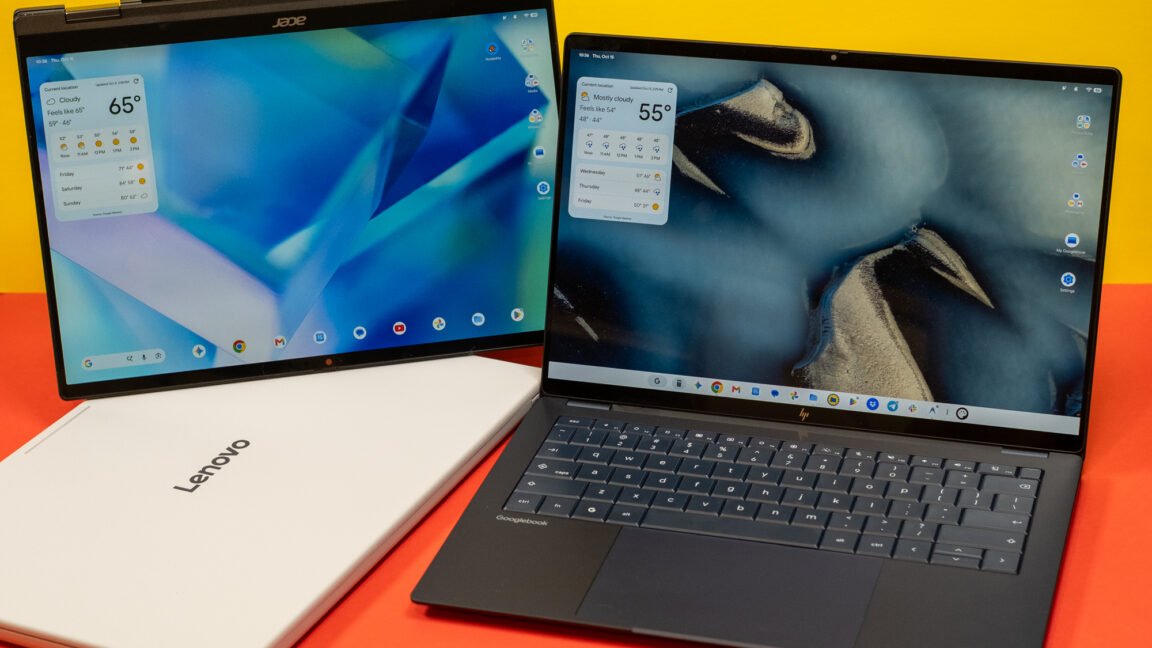
The Evolution of the Googlebook Ecosystem
Google’s latest hardware foray, the Googlebook, represents a significant shift in how the company envisions the intersection of mobile and desktop computing. Designed to bridge the gap between pocket-sized portability and workstation productivity, the platform leans heavily on the Android ecosystem to establish its identity. For current Android users, the initial setup process is remarkably streamlined. By leveraging a QR code verification system during the out-of-box experience, users can initiate a migration of account credentials, app libraries, and system preferences directly from their existing Android handset.
This parity in configuration suggests a future where the transition from a phone to a laptop is as seamless as moving between different home screens on the same device. However, this level of integration is strictly gated by software versioning. The full suite of interoperability features is currently tethered to Android 17. As the rollout of this version remains in its early stages across the global smartphone market, many prospective users find themselves owning hardware that is technically capable of these functions but physically locked out due to operating system constraints.
Leveraging Better Together Services
At the core of the Googlebook’s value proposition is a collection of features categorized under the “Better Together” umbrella. These tools are engineered to eliminate the friction of switching devices during a workflow. Key components include notification synchronization, which broadcasts mobile alerts directly to the laptop display, and file system bridging, allowing the Googlebook to mount the storage of an Android 17 device as a secondary volume.
Beyond simple file management, the platform introduces “Continue On” functionality, intended to maintain state continuity across sessions. Theoretically, this allows a user to interact with a productivity app on their phone, step to their desk, and instantly resume the task on the Googlebook without manually re-opening files or locating their place in a document. When functional, this creates a cohesive environment that prioritizes task fluidity over device-specific barriers. The promise of this system is to make the physical boundary between a phone and a laptop entirely transparent, turning them into two screens controlled by a unified, intelligent background process.
Performance Bottlenecks and Connection Stability
While the conceptual framework of the Googlebook is ambitious, real-world execution faces significant technical hurdles. The reliance on shared Wi-Fi network connectivity is a persistent point of failure. The synchronization protocols frequently struggle when devices transition between network access points, leading to dropped sessions that require a manual handshake to restore. Even within stable environments, the “Continue On” feature remains intermittent, often failing to detect the active state of an application on the secondary device.
The app mirroring feature, which allows users to stream their mobile interface to the laptop screen, also demonstrates inconsistent performance. While beneficial for checking mobile-exclusive utilities, the streaming implementation suffers from latency issues that disrupt interaction. Furthermore, the security architecture of the operating system imposes strict limitations; applications with sensitive authentication requirements or hardware-level encryption often block mirroring entirely. These limitations, compounded by the restriction of single-app streaming and the inability to maintain background processes, significantly reduce the utility of the feature for professional-grade multitasking.
Refining the File Management Experience
Data mobility is central to the Googlebook’s appeal, yet the implementation of mobile file access highlights a disparity between mobile and desktop software maturity. While the Googlebook can reliably browse the directory structure of a connected phone, the transfer speeds are frequently sluggish, suggesting that the wireless handshake protocol is not yet optimized for large data sets.
A glaring asymmetry exists in this relationship: while the laptop maintains read-write permissions over the phone’s storage, the reverse is not true. The Google Files app on the phone remains incapable of reaching back into the Googlebook to retrieve or manage files stored locally on the laptop. This one-way street design undermines the concept of a shared ecosystem. Furthermore, the native Files application on the Googlebook currently lacks advanced organizational tools expected by power users, such as multi-tab navigation or robust support for network-attached storage and remote shares. Compared to mature desktop environments like macOS Finder or Windows Explorer, the Googlebook software suite feels restrictive, prioritizing a simplified, sandbox-oriented approach that may frustrate those accustomed to more granular control over their file hierarchy.
Future Outlook and System Maturation
The Googlebook serves as an important experiment in operating system convergence, but its current iteration indicates that the software is still in a formative stage. The technical potential for a truly integrated “phone-plus-laptop” experience is evident, but it is currently hampered by the slow adoption rate of Android 17 and the underlying instabilities of the Better Together communication protocol. For the platform to achieve long-term success, Google must prioritize the robustness of its wireless handshakes and bring the desktop file management experience up to the standard of contemporary operating systems. Until the platform evolves beyond its current developmental limitations, it remains a promising preview of future connectivity rather than a fully realized professional workstation. As the software matures, subsequent updates will likely resolve these issues, but for now, the experience remains a balancing act between innovative convenience and early-adoption friction.
Disclaimer: This content is auto-generated for informational purposes only.
Source: Read Original News