








Google Bolsters Android Experience with New Motion Assist and Gemini-Powered Search Tools
Google has officially unveiled its latest Android feature drop, introducing a suite of accessibility and utility updates designed to make daily tasks more intuitive for users worldwide. From alleviating motion sickness during travel to leveraging generative AI for organization, the update signifies a major leap forward for the Android ecosystem.
Combating Motion Sickness
Among the most anticipated additions is “Motion Assist,” Android’s answer to Apple’s Motion Cues. Designed to tackle the discomfort of car sickness, this feature overlays subtle dots on the screen that shift in response to the vehicle’s motion. By providing a stable visual reference point, the technology helps the brain reconcile the discrepancy between what the eyes see and what the inner ear feels, offering a more comfortable digital experience for passengers on the go.
Gemini as Your Personal Organizer
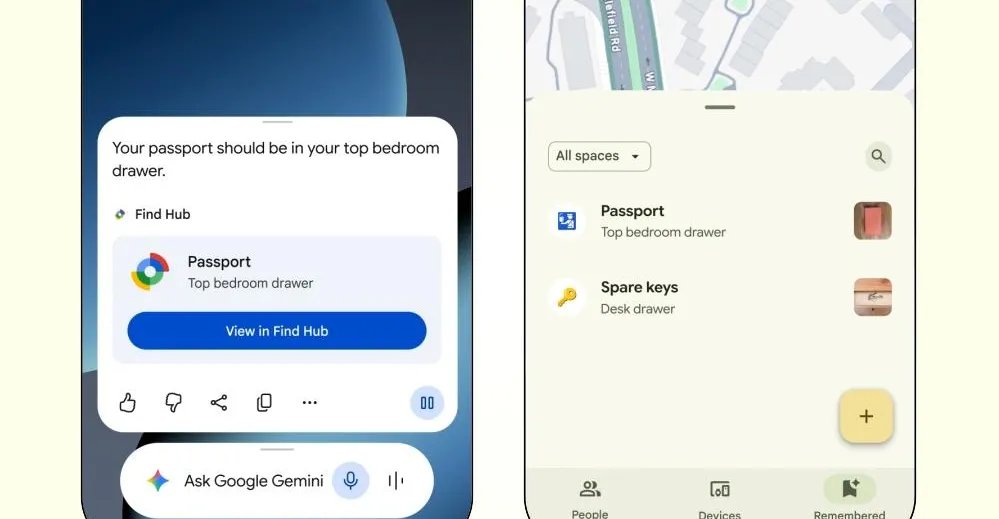
Google is also deepening the integration between its Gemini AI and the Find Hub ecosystem. Users will soon be able to use Gemini to track the locations of infrequent, easily misplaced items—such as passports or birth certificates—without needing physical Bluetooth trackers.
By simply asking Gemini to remember where an item is stored and providing a reference photo, the information is cataloged within the Find Hub’s new “remembered items” tab. When it’s time to retrieve the item, users can either ask Gemini for the location or browse their digital inventory. This feature is slated for rollout on devices running Android 16 or later in regions where Gemini and Find Hub are fully supported.
Enhanced Accessibility and Collaboration
The update also prioritizes accessibility and seamless communication:
- Guided Vision: Gemini Live is gaining the ability to assist users in reading fine print on menus or labels, or identifying specific items in a cupboard. Using the phone’s camera, the feature provides real-time voice feedback to ensure the camera is framed correctly, making it a powerful tool for those with visual impairments. This feature will be accessible on devices running Android 9 and newer.
- Google Messages Upgrades: Communication is becoming more personalized with the introduction of customizable chat themes, allowing users to apply backgrounds that intelligently match the color palette of their text bubbles.
- Shared Keep Notes: To streamline coordination, Google has integrated Keep notes directly into Messages. Every participant in a chat can now create, view, and edit shared notes, making it easier than ever to collaborate on grocery lists, itinerary planning, or project tracking.
As these updates roll out, Google continues to position Android as a versatile platform that emphasizes both the power of generative AI and practical, human-centric solutions for everyday challenges.