






Evolution of Context-Aware Browsing
The landscape of AI integration into web browsers has shifted significantly. Following the cessation of the standalone ChatGPT Atlas browser project, OpenAI has pivoted its strategy toward enhancing existing browser environments. The latest update to the official ChatGPT Google Chrome extension marks a decisive move to integrate generative AI directly into the user’s active workspace. By allowing the AI to interface with open browser tabs, OpenAI is effectively bridging the gap between static chatbots and dynamic, context-aware digital assistants.
This architectural shift focuses on utility rather than isolated browsing environments. Instead of requiring users to navigate to a specific AI-centric browser, the updated extension facilitates a bidirectional flow of information. The model can now “see” the content residing within a user’s active tabs, provided the user explicitly grants permission through a tagging mechanism. This development reflects a broader industry trend where AI tools are no longer just conversational engines but functional participants in the user’s daily digital workflow.
Deep Integration with Browser Data
The core functionality of the new update revolves around the “Chrome” tag within the ChatGPT interface. When a user invokes this tag, the extension scans the active tabs, allowing the model to ingest, summarize, or cross-reference the information present on those pages. For instance, a user evaluating multiple products—such as comparing features, prices, or technical specifications across different vendor websites—can prompt the AI to synthesize these disparate sources into a cohesive summary.
Technically, this integration bypasses the manual requirement of copy-pasting text from various sites into the chat window. By automating the data retrieval process, the extension reduces friction and minimizes the time required to compile research. The AI acts as an intermediary layer that parses HTML structures and text content from multiple sources simultaneously, offering a singular output that is logically structured and tailored to the specific query.
Sidebar Functionality and Workflow Continuity
A significant component of this update is the overhaul of the ChatGPT sidebar within Chrome. Rather than being a stripped-down version of the interface, the sidebar now houses the full suite of ChatGPT capabilities, including access to complete conversation history. Users can maintain continuity in their tasks, such as drafting emails, coding, or planning, without needing to switch tabs or manage multiple windows.
This sidebar integration is designed to keep the user focused on their current objective. By keeping the interface persistent, the extension allows for a fluid transition between browsing and processing. Whether the user is utilizing a standard personal account or the enterprise-grade ChatGPT Work, the sidebar provides a centralized hub for managing prompts and reviewing previous sessions, ensuring that the AI remains a constant, accessible resource throughout the browsing session.
Advanced Capabilities and Task Automation
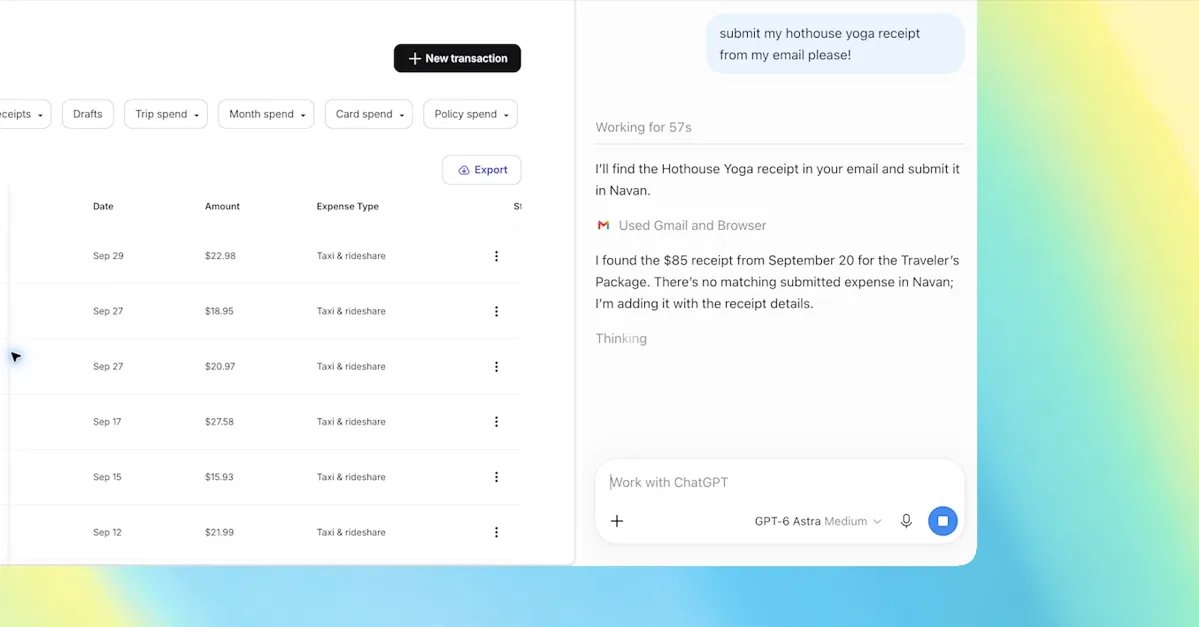
Perhaps the most ambitious aspect of the update is the expansion into “agentic” capabilities via ChatGPT Work. The extension now possesses the technical hooks to interact with browser elements directly. This includes the ability to fill out online forms, initiate communication by sending messages, and manage file downloads. By offloading these repetitive manual steps to the model, the software seeks to automate the more tedious components of web-based work.
For example, a user could task the AI with organizing a clutter of open tabs based on their subject matter, or filling out a recurring expense report based on data present in an open tab. These features mirror the “auto-browse” functionalities emerging in competing platforms like Google Gemini. By moving beyond text generation into the realm of browser manipulation, OpenAI is positioning its extension as a productivity layer that operates on top of the web, rather than just alongside it.
Privacy, Permission, and Practical Impact
While the convenience of having an AI interact with one’s active tabs is substantial, it necessitates a careful look at data interaction. OpenAI has implemented the system with explicit triggers, meaning the AI does not gain access to a user’s browsing history or active tabs by default. Access is granted on a per-request basis, ensuring the user retains control over which information is processed by the model at any given time.
This permission-based model is essential for maintaining user trust in an environment where personal or professional data might be exposed on screen. The impact of these features is most pronounced for power users who frequently navigate large numbers of tabs or conduct deep research. By turning the browser into a collaborative space where the AI understands the context of the user’s current search or project, the technology significantly reduces the cognitive load associated with information management.
The Future of AI-Browser Synergies
The transition from the Atlas project to the browser extension strategy highlights a pragmatic approach to AI deployment. Building a standalone browser is resource-intensive and often meets resistance from users accustomed to their existing ecosystems. By integrating these robust features into the most widely used web browser, OpenAI ensures that its technology remains highly accessible.
As this technology matures, it is likely that the integration between LLMs and browser APIs will become even more seamless. The ability to cross-reference data across tabs, combined with the capability to perform multi-step actions within web applications, represents a foundational change in how humans interact with the internet. As these tools continue to evolve, the distinction between “searching for information” and “executing a task” will likely blur, further solidifying the browser as an active, intelligent partner in professional and personal productivity.
Disclaimer: This content is auto-generated for informational purposes only.
Source: Read Original News